

Want to know the result of MPEG4 vs H264? This post compares MPEG-4 and H.264 and shows the reasons for converting between them. Besides, this article recommends 2 can’t-miss video converters: MiniTool Video Converter and AnyConv.
About MPEG-4
Do you know MPEG-4? Next, let's learn what it is, its advantages and disadvantages, and its differences from MPEG-2 and MP4.
What Is MPEG-4
MPEG-4 (Moving Picture Experts Group-4) is a set of international official standards for digital video and audio compression. MPEG-4 usually refers to MPEG-4 Part 2. It was once a widely used video compression standard. MPEG-4 includes a variety of multimedia content, including video, audio, and interactive media.
MPEG-4 is commonly used for storing digital multimedia content, video conferencing, and television broadcasting. It is designed for low-bandwidth video scenarios compared with earlier standards. It can efficiently encode audio and video at bitrates under 1.5 Mbit/s.
Benefits and Drawbacks of MPEG-4
How about the merits and shortcomings of MPEG-4? The following section provides an overview.
Merits of MPEG-4
MPEG-4 makes excellent audio and video sync by adding timestamps to frames. It also synchronizes other multimedia content. Also, MPEG-4 can support higher resolution videos than older standards. Plus, it has a higher compression ratio, saving bandwidth and storage space.
While MPEG-4’s compression ratio isn't as high as some newer standards, it still provides high-resolution video quality. Furthermore, it is well-suited for complex applications and offers excellent performance. MPEG-4 is commonly used for MP4 files, early streaming media platforms, and various digital devices.
Shortcomings of MPEG-4
MPEG-4 has been replaced by newer coding standards such as H.264 and H.265. For example, compared to these advanced coding standards, it is not suitable for UHD (Ultra High Definition) video.
Furthermore, the MPEG-4 standard is too large, resulting in only a small part being developed and applied. Its full implementation requires high technical costs.
MPEG-4 vs MPEG-2
MPEG-2 and MPEG-4 are 2 important video compression standards. MPEG-2 was developed earlier and primarily used for DVDs and broadcast television. It offers good video quality in a high bitrate, resulting in larger file sizes. Compared to MPEG-2, MPEG-4 can efficiently compress video at lower bitrates without sacrificing much video quality, which makes it suitable for mobile streaming and conferencing.
MPEG-4 vs MP4
MPEG-4 is a multimedia compression standard that defines encoding methods for audio, video, and interactive content. MPEG-4 balances video quality with efficient compression. In contrast, MP4 is simply a digital container format. It can store and transform MPEG-4 encoded audio and video.
About H.264
Next, let's learn about H.264. We can start by what it is and what its advantages and disadvantages are.
What Is H.264
H.264 (Advanced Video Coding/AVC) is a video compression standard developed by the ITU-T (International Telecommunication Union - Telecommunication Standardization Sector). It employs 2 core coding technologies: block prediction and motion compensation. It is one of the most popular format standards in the video field in recent years.
H.264 is primarily used for video compression, video content recording, and video distribution. Besides, it supports resolutions up to 8K ultra high definition with technology expansion. H.264’s high flexibility allows it to be used in broadcast, DVD storage, Blu-ray, and various streaming platforms, such as YouTube, Netflix, and Vimeo.
Benefits and Drawbacks of H.264
What are the advantages and disadvantages of H.264? Read the section below for details.
Merits of H.264
H.264 is known for its high compression efficiency. It utilizes multi-core CPUs to quickly deal with videos, delivering high-quality videos at lower bitrates. Furthermore, H.264 provides high-quality videos with minimal bandwidth, which means H.264 is an ideal choice for applications with limited bandwidth and storage space.
H.264 also offers low-latency video encoding and decoding, resulting in fast video loading. It supports a wide range of resolutions, making it well-suited for various devices and platforms that support high-quality video.
Shortcomings of H.264
To use H.264, there are patent restrictions. So, its costs still need to be controlled. While H.264 has good compatibility, many devices can’t perform its encoding and decoding capabilities due to their own technical limitations.
MPEG-4 vs H.264
PEG4 vs H264, which one should we choose in daily life? Read the comparisons in terms of video quality, compression efficiency, technology, and compatibility.
#1 MPEG4 vs H264: Video Quality
H.264 performs better than MPEG-4 in terms of video quality. When it comes to video quality, the cores are video clarity and detail reproduction. MPEG-4 provides standard video quality for SD video. It doesn’t have clear distortion. It can meet basic viewing needs.
H.264 can retain more video details at low bitrates, even restoring some precise video details such as fabric texture and individual strands of hair. Videos encoded with H.264 are almost free of blurring and distortion, providing highly clear content.
#2 MPEG4 vs H264: Compression Efficiency
H.264 offers better compression efficiency than MPEG-4. The core of video compression lies in compressing the video while maintaining the original video quality. MPEG-4 uses a relatively basic compression algorithm. Therefore, to maintain good video quality, the file size will be larger, occupying more storage space.
However, at the same video quality as MPEG-4, H.264 has higher compression efficiency, reducing the video file size to half that of MPEG-4 with almost no loss in video quality.

#3 MPEG4 vs H264: Technology
MPEG-4 and H.264 differ significantly in their technology. MPEG-4 is a vast suite of multimedia compression standards. It can compress not only video and audio but also handle interactive media content, 3D models, and more.
H.264 is a standard that focuses on encoding and decoding video. It adopts frame-by-frame prediction and motion compensation techniques for video encoding, reducing encoding errors, compressing repeated content, and minimizing the amount of unnecessary data stored.
#4 MPEG4 vs H264: Compatibility
H.264 also excels MPEG-4 in terms of compatibility. Compatibility is one of the aspects used to measure how a codec is. MPEG-4 is an older encoding standard. It supports almost all older devices and players without requiring additional plugins. However, MPEG-4 is rarely used now.
H.264 is one of the advanced and mainstream codecs. It is highly compatible with mobile devices, video platforms, smart TVs, game consoles, and more. Therefore, H.264 is used very frequently.
MEPG-4 vs H.264: Which Is Better
MPEG4 and H264, which one should you choose? Through comparisons of MPEG-4 and H.264, H.264 is generally the better choice. In terms of video quality, H.264 excels at reproducing and processing fine details, especially in high-definition content. It outperforms MPEG-4, which is better suited for standard-definition video.
In terms of compression, H.264 can reduce file size by approximately 50% at the same image quality without significant loss of video quality. According to technology, H.264 is a dedicated video encoder, while MPEG-4 is a general multimedia standard. In terms of compatibility, H.264 works seamlessly with modern devices, but older devices may require additional plug-ins.
Why Convert MPEG-4 to H.264
In terms of video quality, H.264 can accurately reproduce fine details such as hair strands and clothing textures, making the video content closer to reality, far surpassing the standard definition quality of MPEG-4. In terms of compression efficiency, H.264 shrinks file size more significantly at the same video quality, making it more suitable for storage, transmission, and sharing. Videos encoded with H.264 also load faster on streaming platforms.
Furthermore, H.264 is already one of the mainstream encoding formats today, seamlessly compatible with mobile phones, smart TVs, and video platforms. The overall viewing experience using H.264 is more stable and smoother than with MPEG-4.
Therefore, the core reason for converting from MPEG-4 to H.264 is to achieve a better balance of superior video quality, higher compression efficiency, and greater compatibility.
How to Convert MPEG-4 to H.264
Want to process MPEG4 to H264 conversion? There are 2 converters I would like to recommend.
Method 1. MiniTool Video Converter
Still looking for a good video converter? Try MiniTool Video Converter! It is a free video converter and is 100% safe and reliable. MiniTool Video Converter supports conversions between over 1000 formats, including common mainstream encoding formats like MPEG-4, H.264, MP4, MOV, AVI, FLV, MKV, M4V, DivX, MPEG, F4V, and more.
MiniTool Video Converter allows you to freely adjust video resolutions, frame rates, and encoders, audio sample rates, and channels to easily create personalized audio and video effects. In addition, it can deal with audio and video sync issues.
Even better, MiniTool Video Converter presets compatible formats for popular streaming platforms, like YouTube, Vimeo, Instagram, and Facebook, making your conversion work effortless! Moreover, it is built with a handy batch conversion capability that empowers you to handle as many as 5 conversion tasks at the same time efficiently.
Pros:
- No file size restrictions
- A wide range of video parameters customization
- High-efficiency batch conversion
- Up to 4K resolution support
- User-friendly interface
Cons: Only on Windows systems
The conversion steps below are on how to convert MPEG-4 to H.264 with MiniTool Video Converter.
Step 1. Obtain MiniTool Video Converter
Simply click on the download button positioned below to get MiniTool Video Converter on your device. Then, follow the step-by-step setup prompts to install this application.
 MiniTool Video Converter
-
 Batch convert video/audio files among 1000+ formats.
 - Quickly compress videos for easy storage and transfer.
- Accurately extract subtitles from video/audio files.
- Effectively enhance video quality.

Step 2. Add the MOV File Prepared
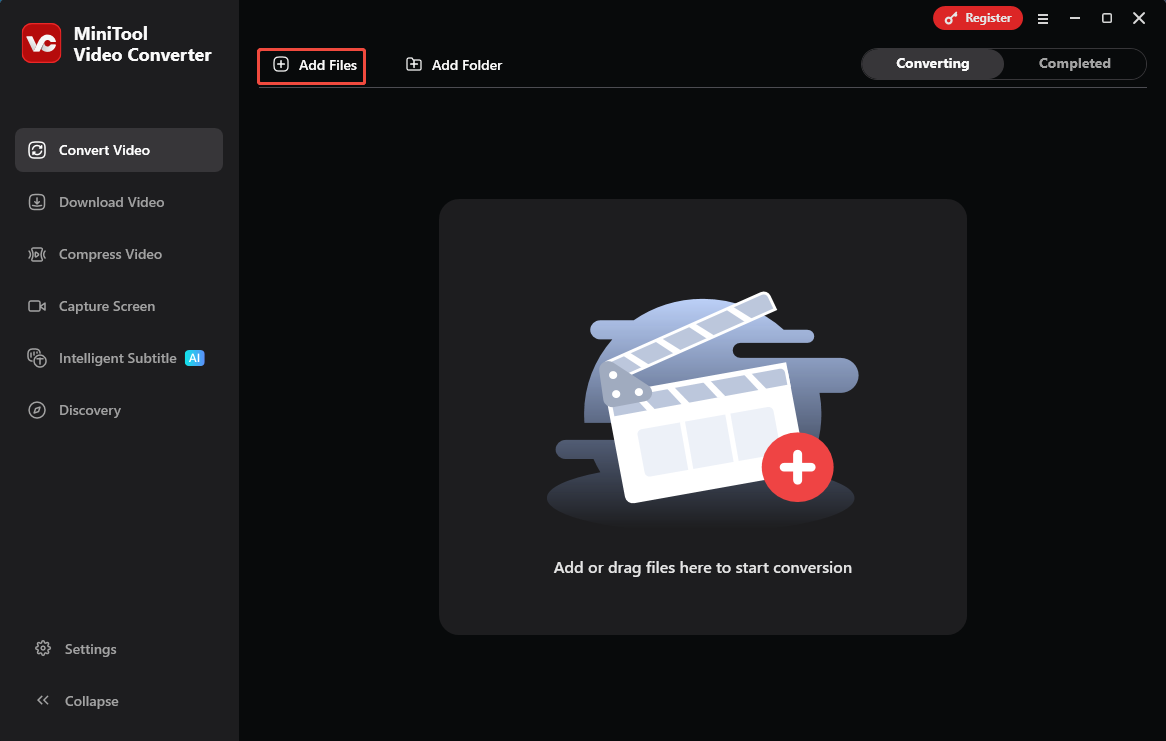
Launch MiniTool Video Converter. Click on the Add Files option to add MPEG-4 encoded video.
Step 3. Configure a Format Encoded by H.264
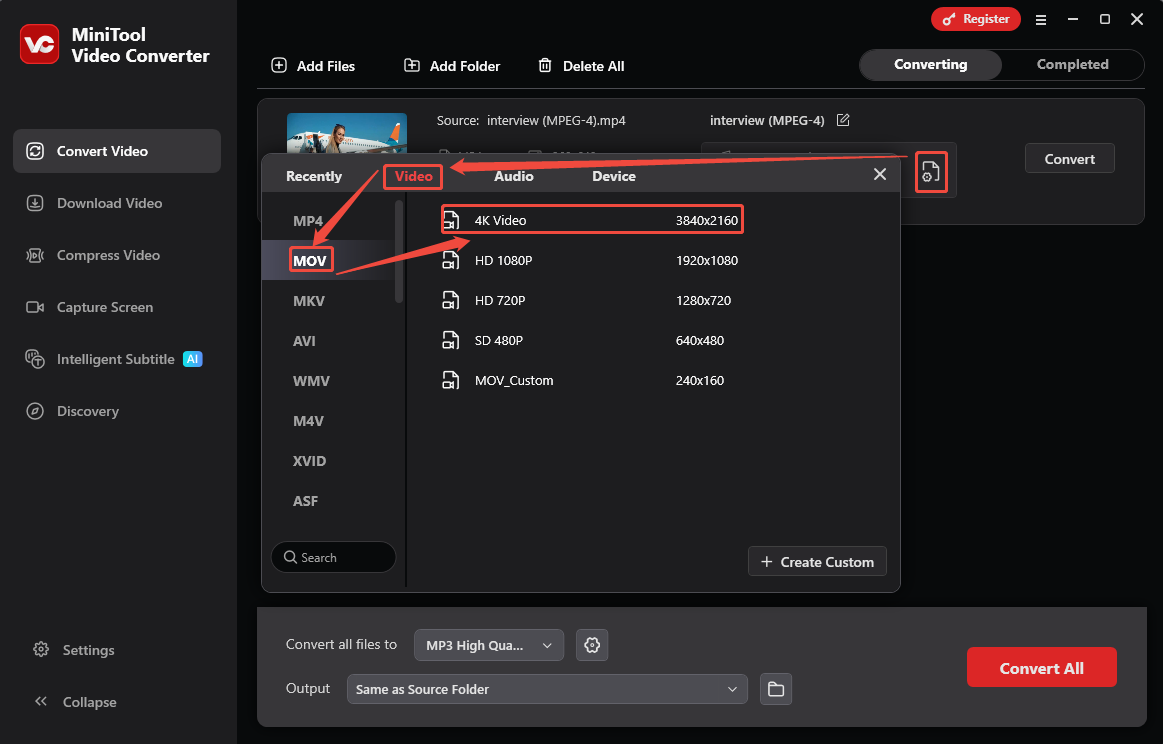
Click on the Gear icon to trigger the output format window. There, switch to the Video tab and select the MOV format encoded by H.264. Then, select a resolution option from the right page. Here, I take 4K Video as an example.
Step 4. Start the Conversion Process
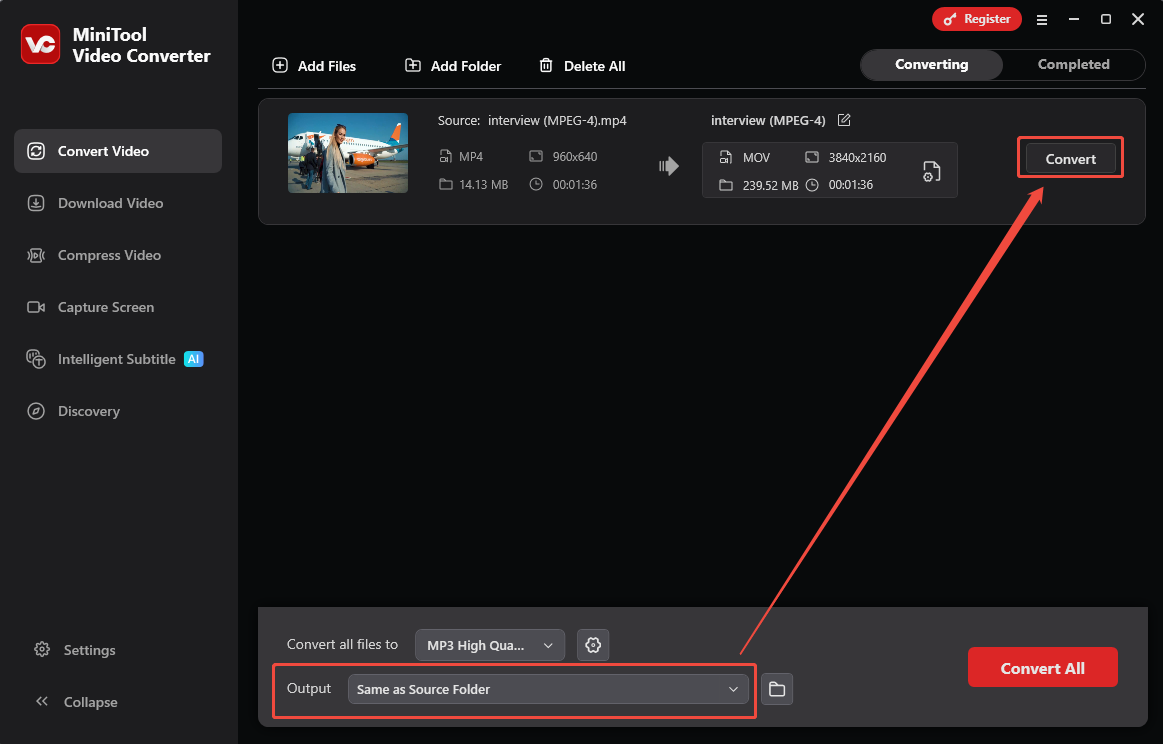
Once the MP4 format encoded by H.264 is set as the output format, the main interface will present the conversion task. There, expand the Output option and choose a saving location. Then, click on the Convert button to start the conversion.
Step 5. Watch and Locate the Converted Video
After waiting a few seconds, this conversion task finishes. The converted video will go to the Completed tab. Then, click on the Play icon or the Folder icon to view or find the converted video on your PC.
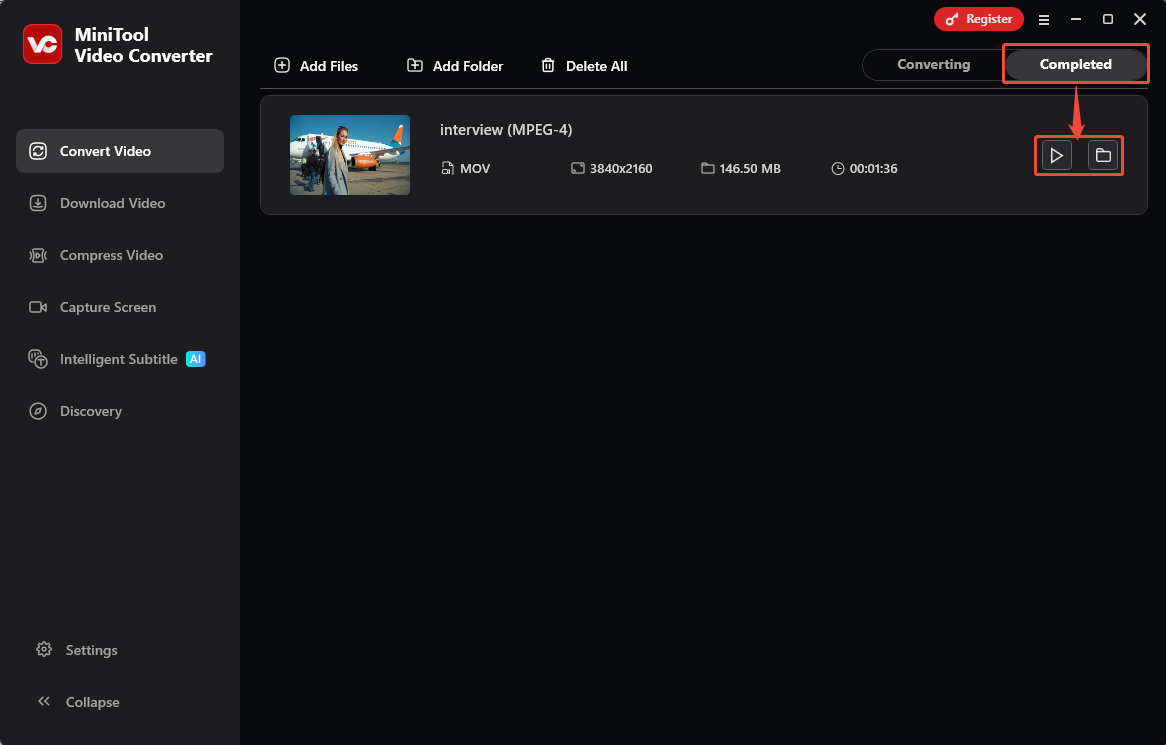
MiniTool Video Converter offers a fantastic video conversion experience. It lets you freely convert MPEG4 to H264 instantly with a super intuitive interface, making it easy for even beginners.
Method 2. AnyConv
AnyConv is an online converter that supports more than 300 formats, including MPEG-4 and H.264 encoding. It focuses on users’ privacy protection. AnyConv typically deletes user-converted files automatically after 1 hour. The following is a tutorial on how to convert MPEG-4 to H.264 with AnyConv.
Pros:
- Compatible with Windows, Mac, Linux, ...
- No download and installation
Cons:
- Only 100MB size for each file
- No batch conversion feature
Step 1. Visit AnyConv’s Conversion Page
Navigate to https://anyconv.com/mp4-to-mov-converter/ to open AnyConv’s conversion page.
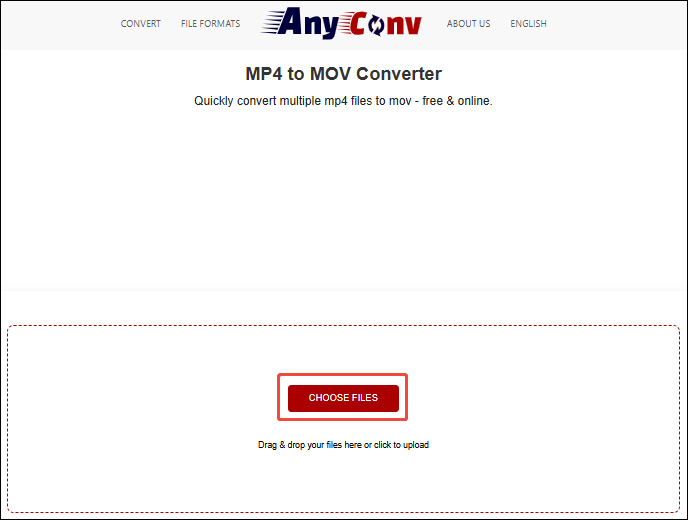
Step 2. Import MPEG-4 Video
Click the CHOOSE FILES option to import your target video.
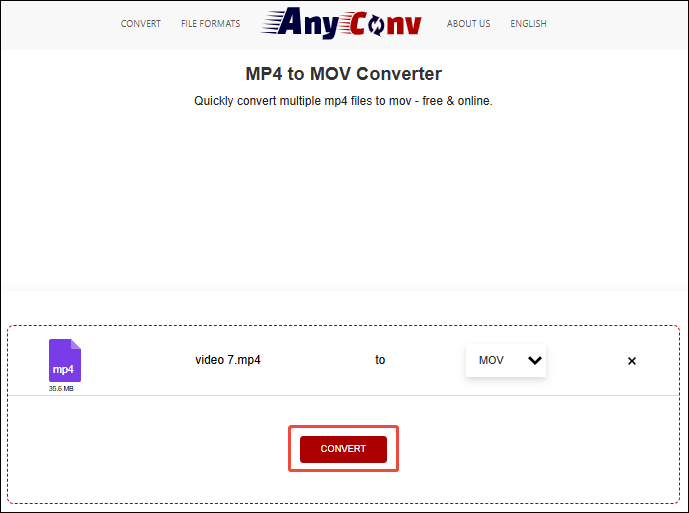
Step 3. Begin the Conversion
Click the CONVERT button to begin the conversion.
Step 4. Check Your Converted Video
When the conversion task completes, click the Download button to save the converted video on your computer.
AnyConv is an ideal online converter for video conversion. If you want to convert a file under 100MB in a hurry, choose AnyConv.
Bottom Line
Based on MPEG4 vs H264, you have learned their differences from video quality, compression efficiency, technology, and compatibility. The comparison results show that H.264 is better than MPEG-4. In addition, this post shares 2 practical MPEG4 to H264 converters, including MiniTool Video Converter and AnyConv.
If you have any questions while using MiniTool Video Converter, you can contact our team via email at support@minitool.com. Alternatively, you can contact me directly on Twitter. I will reply as soon as possible.
User Comments :