

MKA (Matroska Audio) and MKV (Matroska Video) are file extensions for the Matroska multimedia framework. MKA stores audio tracks, album art, and subtitles; MKV stores video with multiple audio streams, subtitles, and chapter menus.
Here are two converters that support MKA to MKV conversion: MiniTool Video Converter and Media.io.
How to Convert MKA to MKV
Fast steps:
- Open a converter (MiniTool Video Converter/Media.io)
- Import the MKA file.
- Select the output format.
- Start conversion.
1. MiniTool Video Converter
MiniTool Video Converter supports multiple formats. You can use this tool to convert MKA to MKV or MKV to MKA. It also supports batch conversion, allowing you to process multiple files simultaneously to save time.
This guide shows you how to convert MKA to MKV with this MKA to MKV converter:
1. Install MiniTool Video Converter.
Download the MiniTool Video Converter installer, then open it and follow the on-screen prompts to complete the installation.
 MiniTool Video Converter
-
 Batch convert video/audio files among 1000+ formats.
 - Quickly compress videos for easy storage and transfer.
- Accurately extract subtitles from video/audio files.
- Effectively enhance video quality.
2. Add target MKA files.
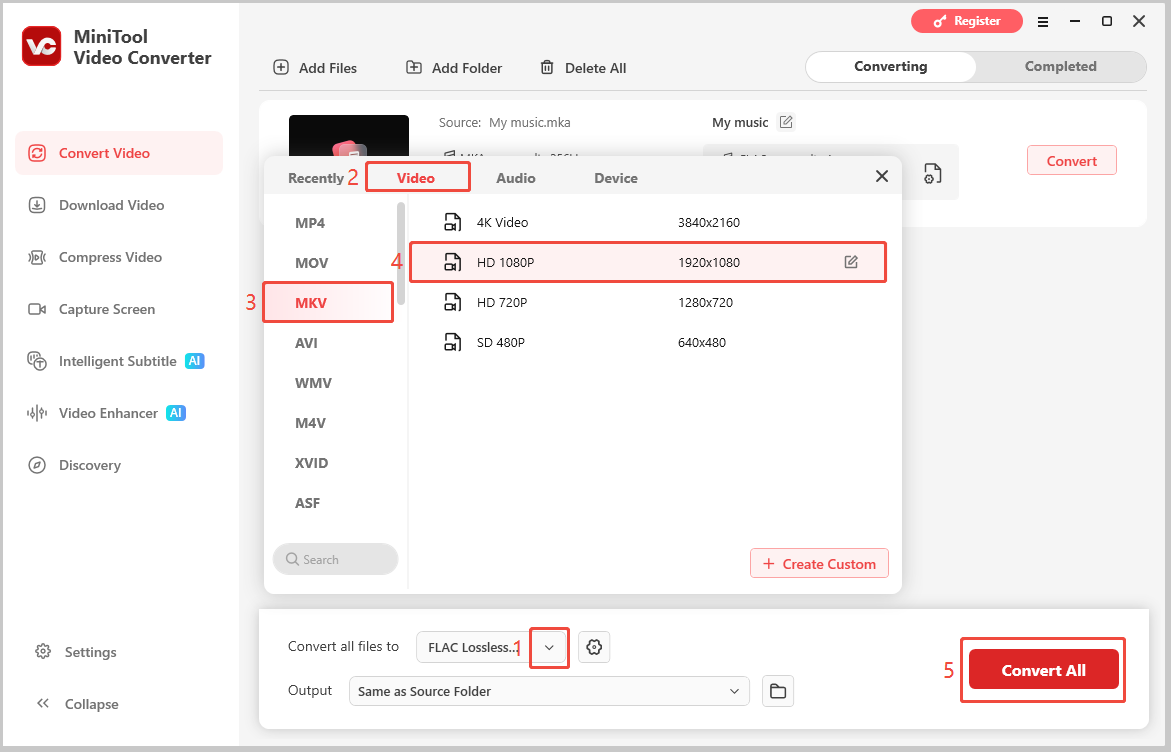
Open MiniTool Video Converter. On the main interface, click Add Files to import the MKA files you wish to convert.
3. Choose MKV as the output format.
Once the files are loaded, click the Convert all files to dropdown. In the format selection window, go to the Video tab, select MKV, and pick your preferred audio quality preset.
4. Start conversion.
Click the Convert All button in the lower-right corner to begin converting your MKA files to MKV.
5. Navigate to the converted file.
After conversion completes, switch to the Completed tab and click the folder icon next to your file to open its save location.
Beyond the Matroska family, it handles a wide range of audio and video formats such as MP4, AVI, MOV, WMV, FLV, MP3, AAC, WAV, FLAC, and more.
Whether you need to extract audio from a video file or switch between container formats to improve compatibility with different media players, MiniTool Video Converter provides a straightforward solution.
2. Media.io
Media.io is an online converter that converts MKA files to popular formats like MKV, MP4, MOV, and AVI for easier playback, editing, and sharing. For files under 2 GB, it lets you convert them online without downloading software. Here is how:
1. Visit the official website.
Open a web browser, paste http://media.io/apps/converter/ into the address bar, and press Enter to access Media.io.
2. Upload the MKA file.
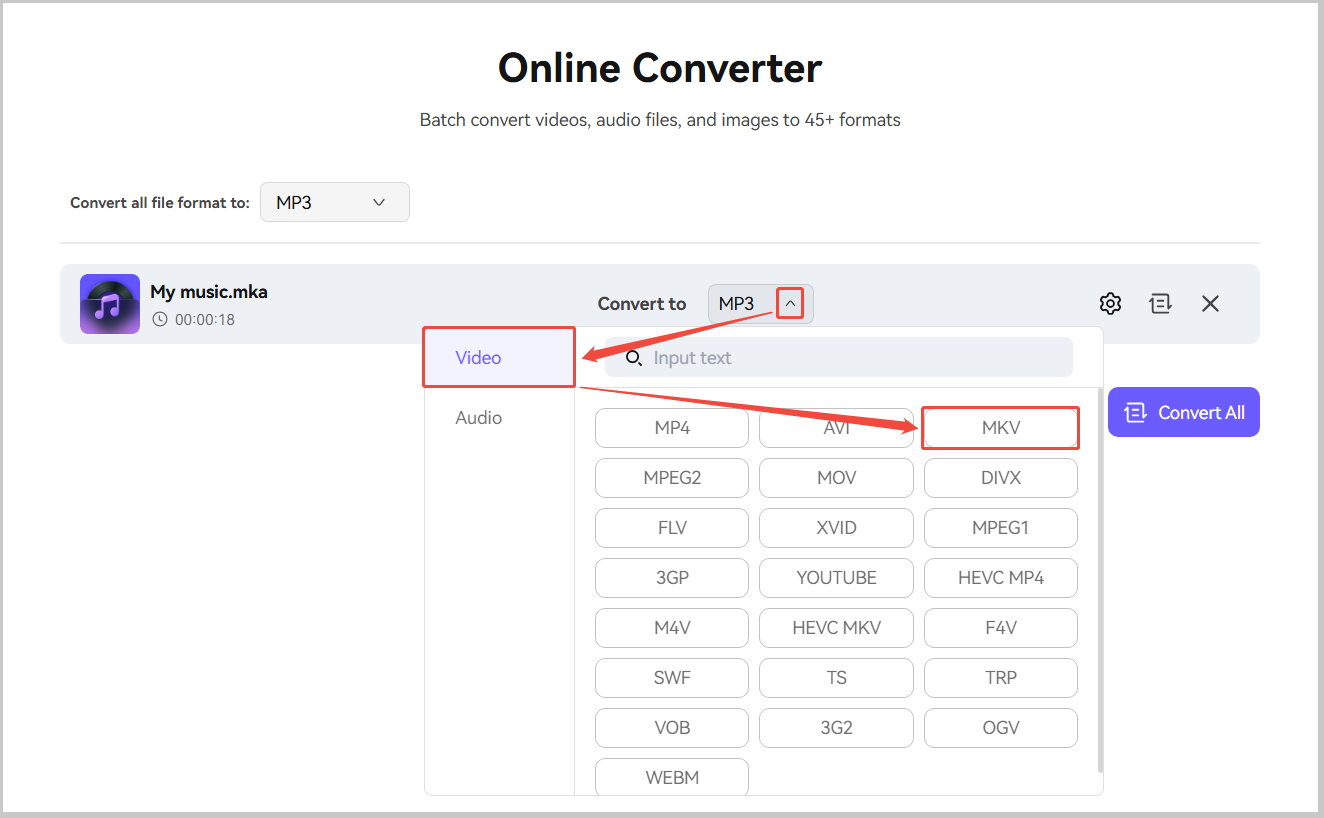
Click the plus button to import the MKA file.
3. Choose MKV as the output format.
Open the Convert to menu, choose the Video tab, and select MKV.
4. Start conversion.
Click the Convert All option to start conversion.
5. Download the converted file.
Click the download icon to save the MKA file.
MKA vs MKV: Quick Comparison Table
| MKA | MKV | |
| File Size | Small | Large |
| Compatibility | Limited | Wide |
| Common Uses | Storing high-quality audio tracks | Storing movies, TV shows, and multimedia content |
| Media Content | Mainly audio streams | Video, audio, subtitles, pictures, chapters, and metadata |
1. File Size
MKV files are usually larger than MKA files because MKV contains more content. However, not all MKV files are larger than MKA files. A short MKV file with compressed video may be smaller than a long MKA file with lossless audio.
2. Compatibility
MKV has better compatibility because it is widely used in various video players. MKA, on the other hand, requires a specific media player or software.
3. Common Uses
MKA, as an audio container, is primarily used for audio storage. It is suitable for storing high-quality or multitrack audio files. MKV, on the other hand, is designed specifically for multimedia storage. It is generally used for movies, TV series, and media archiving.
4. Media Content
MKA is a pure audio container that can only store audio. MKV, on the other hand, is a multimedia container that can combine video, audio, subtitles, chapters, and metadata into a single file.
![Unlock the Secrets of MKV to F4V Conversion [Desktop/Online]](https://images.minitool.com/videoconvert.minitool.com/images/uploads/2024/12/mkv-to-f4v-thumbnail.jpg)
Why You Should Convert MKA to MKV
- Improved Compatibility
- Preserves High-Quality Audio
- Easier to Add Embedded Subtitles
- Reduces the Number of Files
1. Improved Compatibility
A wide range of multimedia players, video editing software, and streaming platforms support MKV. Converting MKA to MKV makes it easier to play and edit on different programs.
2. Preserves High-Quality Audio
MKV supports high-quality audio codecs such as FLAC and AAC. Converting MKA to MKV preserves the original audio quality while converting the audio tracks to a more universal format.
3. Easier to Add Embedded Subtitles
MKV supports embedded subtitles. After converting MKA to MKV, users can combine audio, video, and subtitle files into a single container.
4. Reduce the Number of Files
Keeping audio, video, subtitles, and other media files separately can make file management inconvenient. Converting MKA to MKV combines the audio track with video and other content in a single container, helping reduce the number of files stored on your computer.
Conclusion
Converting MKA to MKV creates a more versatile media file for playback, editing, and sharing. Both MiniTool Video Converter and Media.io offer simple ways to complete the conversion.
For technical support with MiniTool Video Converter, email support@minitool.com.
User Comments :