

This post shows you how to convert French speech to text with MiniTool Video Converter. The process is straightforward. Select a model in the software, upload your French audio file, check the transcript, and finally save the text file.
The advent of Automatic Speech Recognition technology has enabled us to convert audio into text, thereby enhancing work efficiency. Currently, we can find a wide variety of audio transcription tools available on the market, many of which support the recognition of diverse languages. According to Ethnologue’s 2026 data, French has about 76 million native speakers. This makes it one of the world’s top 30 most spoken languages. Because French is so widely used, almost all major transcription tools now support it.
Whether you are a student looking to obtain French class notes, a journalist transcribing French interview recordings, or a content creator aiming to add French subtitles to videos, you can use transcription tools to convert French speech to text. This can save you a significant amount of effort.
How to Transcribe French Speech to Text
Fast Track Steps:
- Install MiniTool Video Converter.
- Choose an AI model for speech-to-text conversion.
- Upload your French audio file.
- Check and edit the transcript.
- Export the text file.
MiniTool Video Converter’s Intelligent Subtitle feature excels at transcribing audio in various languages, including French, Spanish, English, Japanese, Korean, German, and more. This application seamlessly handles a wide range of audio formats, including MP3, WAV, M4A, CAF, AIFF, WMA, and more, allowing me to transcribe audio directly without the hassle of extra format conversion steps.
I have successfully transcribed five French audio files using MiniTool Video Converter. So far, the software appears to have no file duration limits. Therefore, I would like to recommend it to you.
Furthermore, the software offers flexible export options, supporting both SRT and TXT formats. The SRT format is particularly useful, as it preserves precise timestamps for every sentence. Unlike many other transcription tools, this speech-to-text tool has no limits on the number of transcriptions, making it ideal for users with extensive transcription needs.
Whether dealing with French podcasts, interviews, or meeting recordings, the application handles them all with ease. Below is how I convert French speech to text with it.
 MiniTool Video Converter
-
 Batch convert video/audio files among 1000+ formats.
 - Quickly compress videos for easy storage and transfer.
- Accurately extract subtitles from video/audio files.
- Effectively enhance video quality.
1: Download and Install
Download and install the application on the computer.
2: Select an AI Model
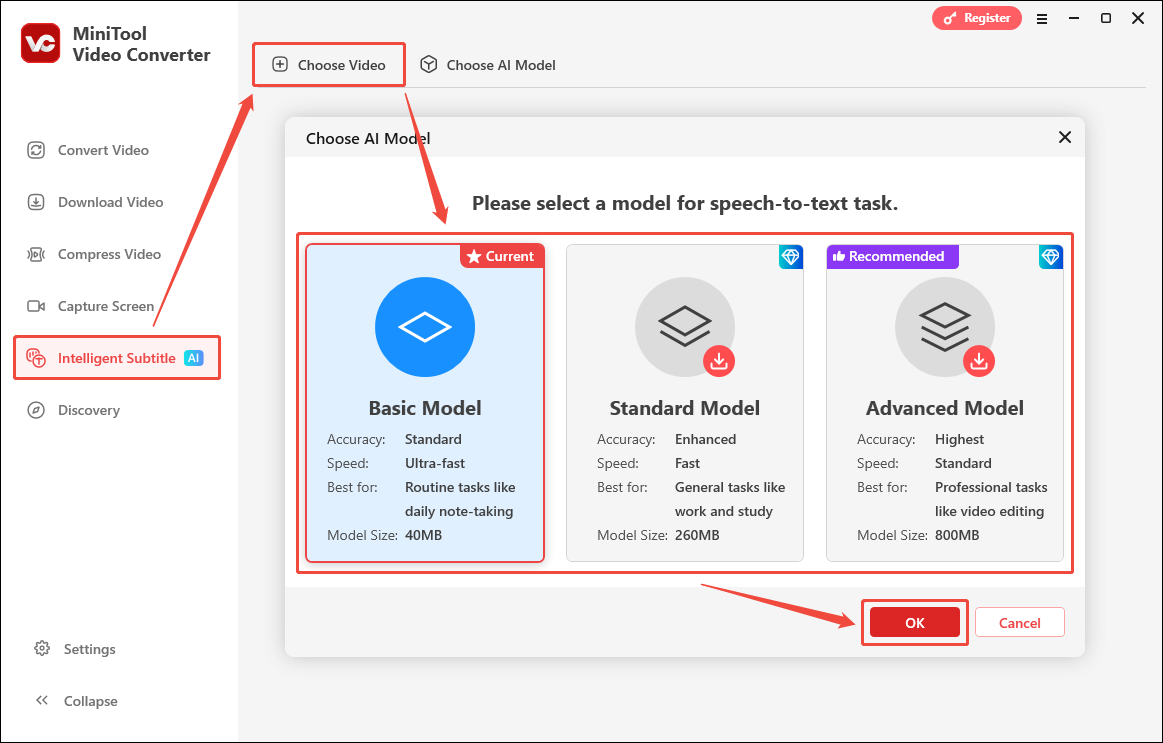
Launch the transcription tool, go to the Intelligent Subtitle tab, and select the Choose Video option. Then, select an AI model based on your needs. Here, I select the Basic Model and click OK.
3: Import the French Audio
After downloading an AI model, File Explorer will automatically pop up. Select the target French audio file and click Open to import it into the application.
4: Check and Revise the Transcript
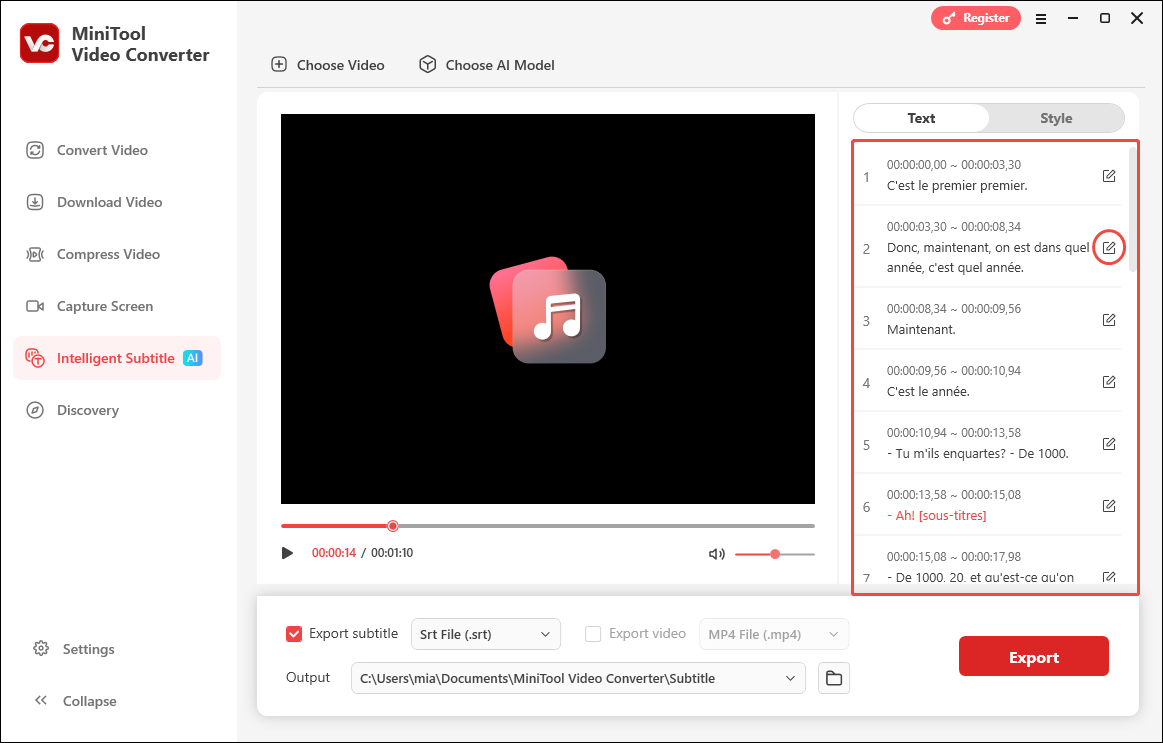
After importing the file, wait a few seconds for the audio transcript to appear on the right side of the interface. At this point, carefully review the text sentence by sentence. If any incorrect words appear, correct them directly and click the checkmark to save the changes.
5: Select an Output Format
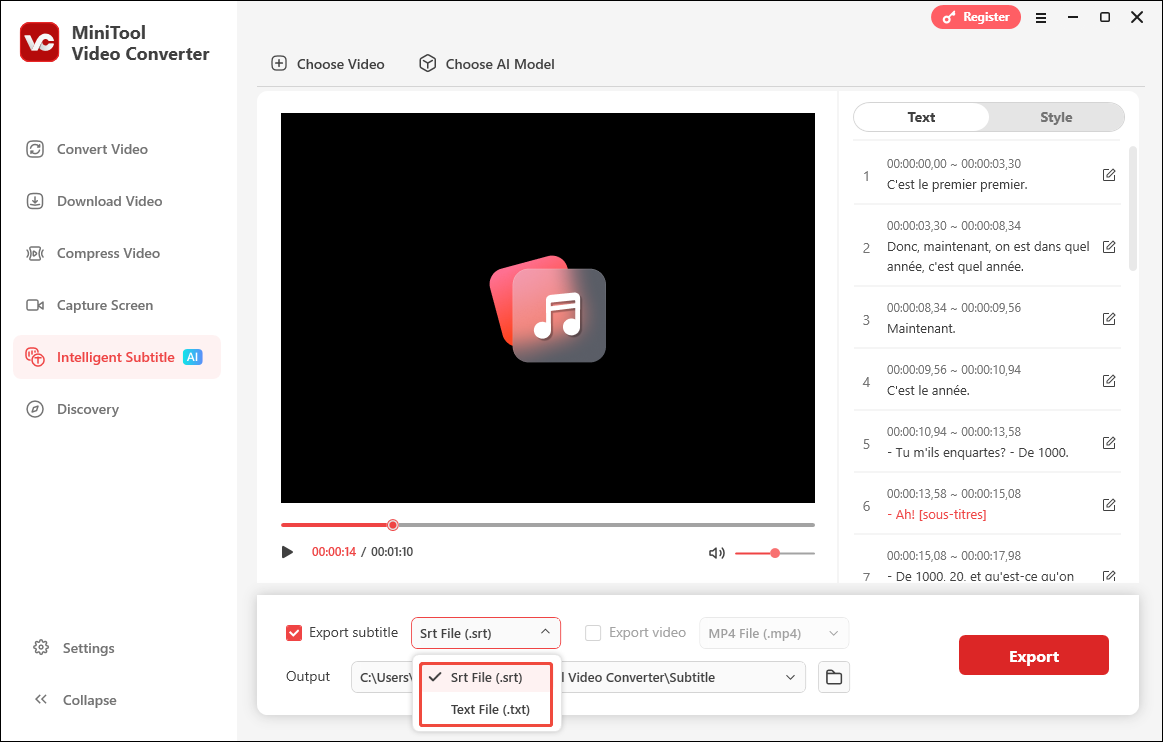
Next, expand the Export subtitle option and select a preferred text format. SRT is typically the best choice, as it has broad compatibility across most video players and editing software.
6: Select the Save Folder and Export the Transcript
Expand the Output dropdown at the bottom of the interface, select a destination folder, and click Export to save the text file.
MiniTool Video Converter is the fastest free tool I have ever encountered for transcribing French audio into text. Even when handling a long audio file, it delivers accurate transcriptions within an exceptionally short processing time. Additionally, the software can compress video files without losing quality and facilitate seamless conversions between various audio and video formats.
What Makes a Good French Speech-to-Text Converter
To convert French audio to text, a transcription tool is essential. Based on my own experience, I have outlined five truly critical key points. In my view, only a tool that excels in all five of these areas can truly boost work efficiency and optimize workflows:
- French audio support
- High accuracy
- Fast speed
- No file size and duration limit
- Support multiple formats
1. Supports French
When converting French audio into text, first check that the transcription tool supports French. If not, the software may process the audio in English or another language by default, resulting in nonsense content that has no relation to the original recording.
2. High Accuracy
Another crucial point is the accuracy of the transcription tool. A tool that handles different accents and specialized terminology well will naturally produce better results. Furthermore, some transcription tools include built-in text-editing features, enabling rapid corrections. This further improves accuracy.
3. Fast Speed
Processing speed is also one of my primary considerations when evaluating transcription tools. Sometimes I need to process large volumes of audio and video files under tight deadlines. In such situations, a tool capable of rapid transcription is essential. If a tool can use intelligent algorithms to maximize a computer’s performance capacity, it can achieve remarkably fast processing speeds.
4. No File Size and Duration Limit
Whether transcribing online French meetings, lectures, or movies, these recordings often range in duration from several tens of minutes to over an hour. Therefore, I pay attention to whether a transcription has any limits on file size or duration. If the target video or audio file is too large, it cannot be uploaded or processed successfully. This not only wastes time but can also lead to project delays.
5. Supports Multiple Formats
Finally, I believe an excellent transcription tool should also support a wide variety of video and audio formats. Currently, we have many ways to record audio and video, such as using smartphones, cameras, voice recorders, and screen recording software. These devices and platforms can generate files in different formats, such as MP4, WAV, MOV, AVI, MKV, MP3, M4A, and AAC. If a transcription tool can’t accept all these different file types, it simply won’t work for everyone's needs.
Furthermore, the transcription tool should also support exporting the text in some common formats, such as TXT and SRT. This would allow users to create accessible subtitles, edit or archive them as plain text, and more.
Considering the five main factors above, MiniTool Video Converter stands out and becomes my top recommendation.
Tips on Transcribing French Audio to Text
Throughout the transcription process, I've been thinking about how to improve transcription accuracy. Here are two techniques I believe can effectively improve it.
1. Prioritize Audio Recording Quality
High-quality audio should feature clear vocals and be free of noise. If I were to record French audio myself, I would use a high-quality microphone. A superior microphone not only captures clear sound but also minimizes background noise, thereby making the resulting audio easier for transcription software to recognize.
However, most of the time, the audio I need to transcribe was not recorded by me. If the vocals in the source audio are weak or the background noise is excessive, I use specialized tools such as Adobe Podcast’s Enhance Speech to enhance the vocals and reduce the background noise.
2. Proofread the Transcripts
While transcribing French audio, I have constantly been considering how to further enhance accuracy. I believe that proofreading is an indispensable step, because there are no transcription tools currently available on the market that can guarantee completely accurate results.
Tools such as MiniTool Video Converter allow users to edit the transcribed text before exporting it. Once I get the transcript, I perform an initial check within the software to verify spelling and punctuation. Any errors found can be corrected immediately. Furthermore, after exporting the transcript, I conduct a thorough review and format the text for clarity and organization.
To Wrap Up
This article explores how to select a suitable transcription tool. Based on the criteria outlined, MiniTool Video Converter is recommended, and a demonstration is provided on how to use it to convert French speech to text. To enhance transcription accuracy, improve the quality of the audio recording, or utilize tools to proofread the generated text.
If any problems arise while using MiniTool Video Converter, please contact support@minitool.com for a prompt response.
People Also Ask
About The Author

Position: Columnist
Cora is a tech writer specializing in digital media workflows, with over six years of hands-on experience in video post-production, media transcoding, and screen capture. Her writing is always clear and practical. Cora also produces in-depth software reviews for users across skill levels to help them find the right tool and enjoy video editing.
User Comments :