

MXF vs MOV differs in usage, compatibility, compression, and editing. MXF suits professional production with complex workflows, while MOV offers broader compatibility, smaller files, and easier editing. This guide also provides 4 MXF to MOV converters, including MiniTool Video Converter, Any Video Converter, CloudConvert, and Convertio.
MXF (Material Exchange Format) is a royalty-free digital video and audio container format defined by SMPTE (Society of Motion Picture and Television Engineers) standards. It can seamlessly contain video, audio, and text in different digital programs.
MOV is the file extension for Apple’s QuickTime File Format (QTFF) and a common format in the Apple ecosystem. It can store video, audio, and text in multiple tracks and works across Windows, Android, and Linux.
MXF vs MOV: Key Differences
Below is a table about MOV vs MXF in terms of usage, compatibility, compression efficiency, and editing performance.
| MXF | MOV | |
| Usage | Professional broadcasting | Playback and editing |
| Compatibility | Limited | Broad |
| Compression Efficiency | Lower, larger files | Higher, smaller files |
| Editing Performance | Complex, professional | Easy, fast |
#1. Usage
MXF is mainly used in professional film, television, and broadcasting, while MOV is more common for playback and editing, especially in the Apple ecosystem.
As a professional-grade format, MXF stores video and data with reliable multi-track editing support and a complex metadata structure. On the other hand, MOV is a common video container format used for playback and smooth editing, especially in the Apple family.
#2. Compatibility
MOV has much broader compatibility than MXF across professional and consumer platforms.
Although it supports multiple codecs, many popular media players, including VLC Media Player, QuickTime, and Windows Media Player, may not support it.
MOV supports playback on mainstream players such as QuickTime Player, Windows Media Player, PotPlayer, VLC Media Player, KMPlayer, and RealPlayer.
#3. Compression Efficiency
MOV generally offers better compression efficiency and smaller file sizes, while MXF prioritizes professional-quality output.
MXF supports various codecs, including ProRes, DNxHD, and CinemaDNG. These camera-compatible codecs often use lower compression to maintain high video quality, resulting in larger files. MOV supports codecs such as H.264 and H.265, which provide high compression efficiency with little quality loss.
#4. Editing Performance
MOV is easier and faster to edit, while MXF is better suited to complex professional editing projects.
MXF supports multiple media tracks and sophisticated metadata, making it suitable for complex professional workflows. MOV offers simpler editing and better usability for everyday video editing.
MXF vs MOV: Which Is Better
- MXF: Better for professional video production, broadcasting, camera recording, and complex post-production workflows.
- MOV: Better for everyday video editing, playback, sharing, and wider compatibility.
Based on the comparison of MXF and MOV, MXF is better suited to professional production. Its professionalism and stability make it associated with film, television, and broadcast environments. If your work requires recording, saving, and editing video with a camera, MXF is a better fit for your needs, simplifying the post-production process.
In contrast, MOV is more appropriate for everyday use. It encodes smaller videos, making them easier to transfer, share, edit, and play. For ordinary users, MOV is usually a more convenient choice.
All in all, MXF is more suitable for professional-level production, while MOV is a better fit for everyday editing and playback. The choice depends on whether you prioritize workflow stability or compatibility.
How to Convert MXF to MOV
Fast steps:
- Choose a video converter.
- Import MXF video.
- Choose MOV as the output format.
- Start conversion.
Option 1. MiniTool Video Converter
MiniTool Video Converter is a free video converter that supports fast MXF-to-MOV and MOV-to-MXF conversion. It supports batch conversion of up to 5 tasks without watermarks, ads, or size limits, with options to adjust resolution, frame rate, bitrate, and more.
MiniTool Video Converter uses hardware acceleration, working with Intel, NVIDIA, or AMD GPUs to deliver faster conversions while maintaining quality. In my test, converting a 2GB MKV to H.264 MP4 at 1080p took about 4 minutes on an NVIDIA RTX 3060 system. That’s competitive.https://crepal.ai/blog/aivideo/minitool-video-converter-review/
Now, look at the steps to learn how to convert MXF to MOV with MiniTool Video Converter.
1. Launch MiniTool Video Converter.
Download MiniTool Video Converter, then complete the installation based on the on-screen instructions, and then launch this MXF to MOV converter.
 MiniTool Video Converter
-
 Batch convert video/audio files among 1000+ formats.
 - Quickly compress videos for easy storage and transfer.
- Accurately extract subtitles from video/audio files.
- Effectively enhance video quality.
2. Import the target MXF file.
Click the Add or Drag file here to start conversion area to browse for the MXF files you want to convert, select them, and click Open.
3. Choose MOV as output format.
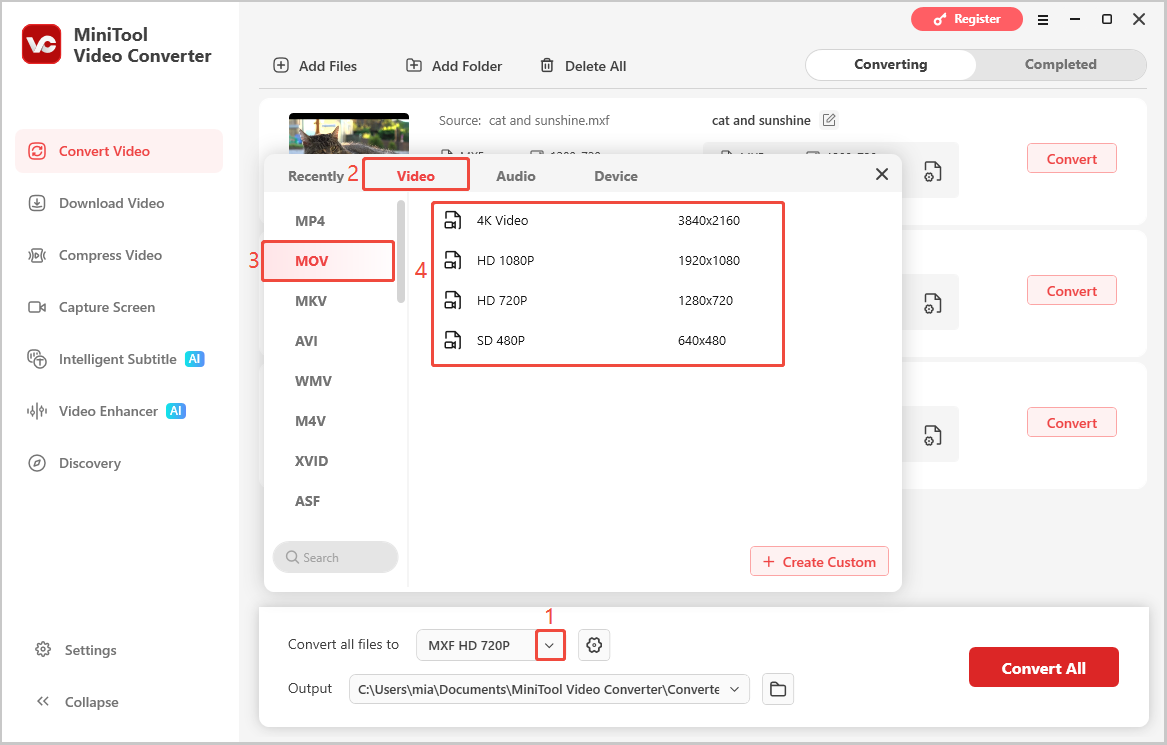
Click the arrow icon next to Convert all files to, choose the Video > MOV, then choose the desired video quality.
4. Select the destination folder.
Expand the Output option, click Browse to select a folder to save the converted files, and click Convert All to start the batch conversion.
5. Find the converted file.
When the conversion is done, go to the Completed tab, and click the folder icon to locate the converted files directly.
Option 2. Any Video Converter
Any Video Converter offers Free, Pro, and Ultimate versions, all supporting watermark-free MXF-to-MOV conversion.
The free version supports format conversion, CD audio extraction, video editing, and downloads from 100+ websites, while paid versions add features like DVD conversion and video recording.
Here’s how to convert MXF to MOV with Any Video Converter Freeware.
1. Download and launch the converter.
Download Any Video Converter Freeware, install and open this program.
2. Import the MXF video.
Tap the Add or Drag File(s) button to add your MXF video. Before conversion, you can click the Add Effects button to open the editor window and edit this MXF file.
3. Select MOV as the output format.
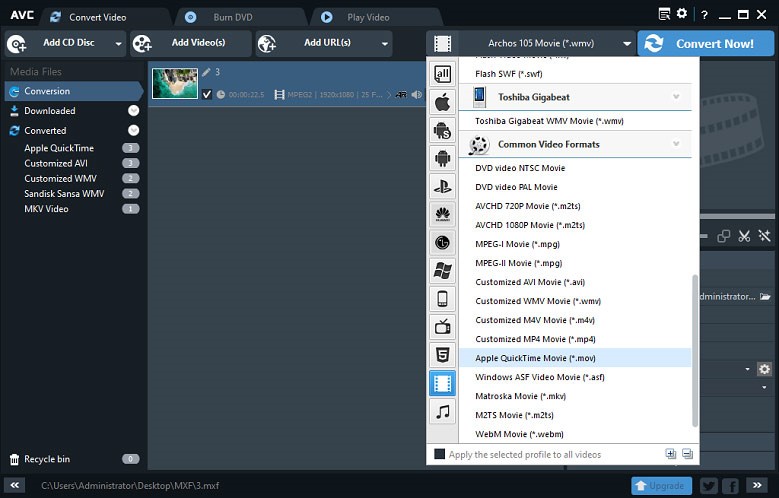
Click the Select output profile icon, then tap the Video Files icon, and select the Apple QuickTime Movie (*.mov) option.
4. Adjust the output settings.
Go to the Basic Settings on the right side, then you can rename this file, choose another output folder, select the video quality, etc.
5. Start the MXF to MOV conversion.
Finally, click the Convert Now! button at the top right corner to start MXF to MOV conversion.

Option 3. CloudConvert
CloudConvert is a browser-based converter that supports high-quality MXF to MOV or MOV to MXF conversion. It empowers you to convert between over 200 formats.
Apart from these, CloudConvert also supports customizing the video codec, aspect ratio, volume, and more. It also enables you to trim and add watermarks.
Here is how to convert MXF to MOV with this online tool:
1. Upload the file.
Drag and drop your MXF file onto the site (https://cloudconvert.com/) or click the Select File to pick it from your device or cloud storage.
2. Select format.
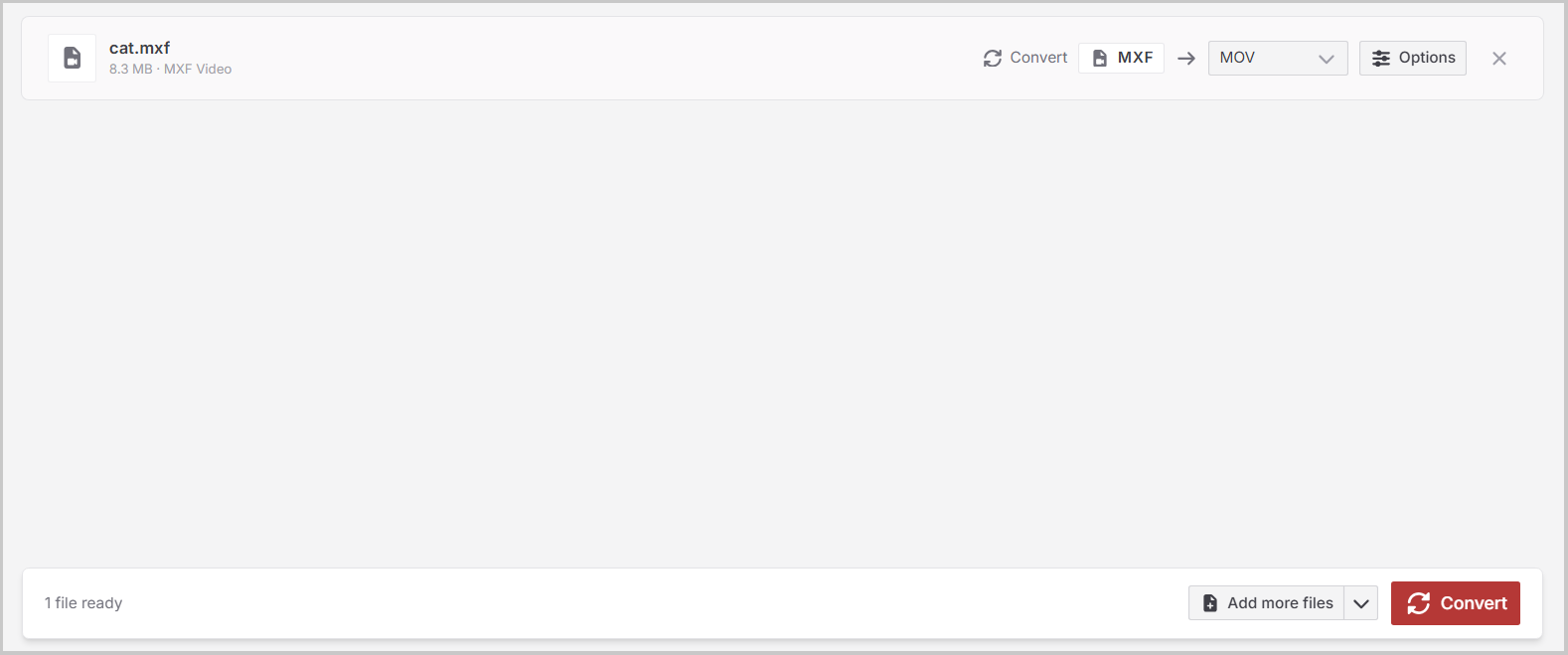
Choose MOV as your target or output format from the menu.
3. Convert and save.
Hit the Convert button and wait for the process to finish, then download your MOV file.
Option 4. Convertio
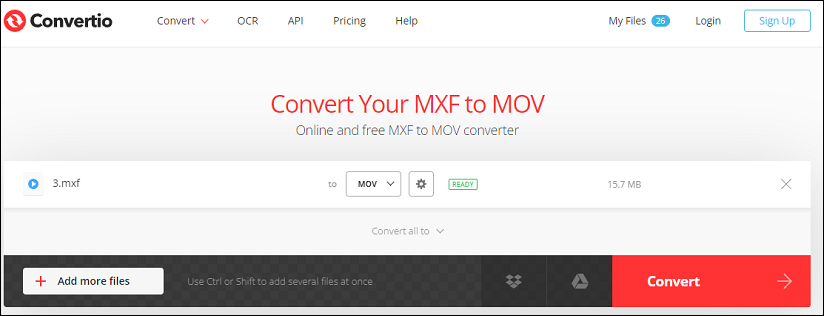
If you want to convert MXF to MOV online, Convertio is recommended here. It’s a useful online file converter to change the formats of videos, audio files, images, and documents. You can use it without registration and for free, with a 100 MB maximum file size limit.
Here’s how to convert MXF to MOV online using Convertio.
1. Open Convertio.
Go to the Convertio website (https://convertio.co/).
2. Upload the MXF file.
Click Choose Files to upload an MXF file from your computer or Dropbox or Google Drive.
3. Select MOV and start conversion.
Then choose MOV as the output format, and click Convert.
4. Download the converted MOV file.
After finishing the conversion, download the MOV file to your PC.
Bottom Line
MXF vs MOV, choose MXF for professional video production, broadcasting, camera recording, and complex post-production, and choose MOV for everyday editing, playback, and sharing.
If a MOV file is needed, use a video converter such as MiniTool Video Converter, Any Video Converter, CloudConvert, or Convertio to convert MXF to MOV.
If you have any problems when using MiniTool Video Converter, please send an email to support@minitool.com to ask for help.
User Comments :