

How to Convert MKA to OGG
- Choose a video converter (MiniTool Video Converter or VLC)
- Import the target MKA file.
- Choose OGG output format.
- Begin the conversion process.
- Locate and view the new OGG file.
Option 1: MiniTool Video Converter
MiniTool Video Converter is a user-friendly software for converting video and audio files between different formats. It supports a wide range of formats, including MKA, OGG, ALAC, FLAC, AAC, MKV, WMV, WebM, MP4, and many more.
Follow the guide below to learn how to use MiniTool Video Converter for MKA to OGG conversion.
1. Launch MiniTool Video Converter.
Download and install this video converter on your Windows computer, then open the program.
 MiniTool Video Converter
-
 Batch convert video/audio files among 1000+ formats.
 - Quickly compress videos for easy storage and transfer.
- Accurately extract subtitles from video/audio files.
- Effectively enhance video quality.
2. Import MKA audio.
Go to the Convert Video section and click Add Files to upload the MKA audio file.
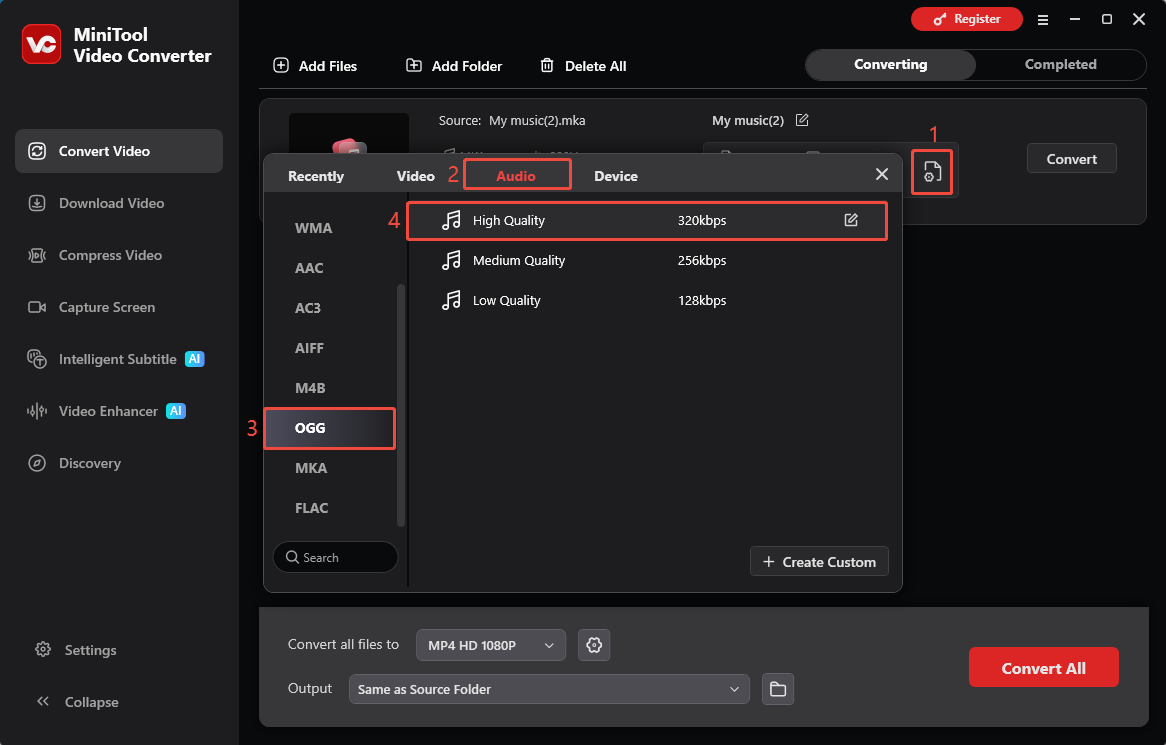
3. Choose OGG as the output format.
Click the gear icon next to the imported file. In the output format window, choose Audio, select OGG, and choose the desired audio quality.
4. Choose the output folder.
Expand the Output option and select a destination folder to save the converted OGG file.
5. Start conversion.
Click Convert to begin converting MKA to OGG.
6. Find the converted file.
After the conversion is complete, go to the Completed tab or click the folder icon to locate and check the converted OGG file.
Option 2: VLC Media Converter
VLC Media Converter is known as an open-source multimedia player. It supports a wide range of audio/video formats, including MP4, MKA, OGG, MKV, FLAC, MP3, and more.
This application can recognize MKA containers and extract the audio streams inside them. It also supports OGG as an output format, making the MKA to OGG conversion possible.
Here’s how to convert MKA to OGG using VLC Media Player.
1. Open VLC Media Player.
Install and launch VLC Media Player.
2. Import MKA files to VLC.
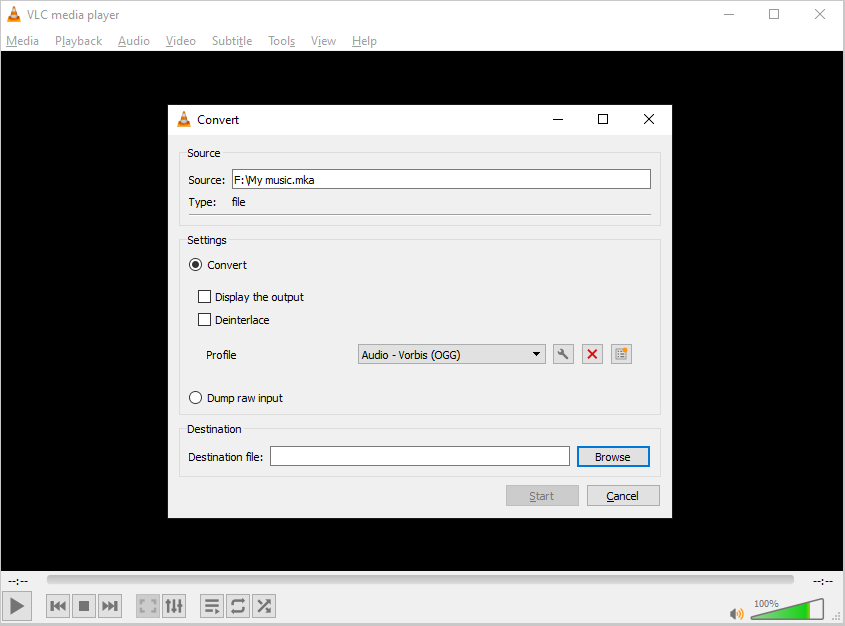
Open the Media menu and choose Convert / Save. Click Add to import the MKA files and click Convert / Save.
3. Choose OGG as the output format.
In the Profile box, choose OGG as the output format. Then, click Browse to select a destination folder and rename the output file if needed.
4. Start the conversion process.
Click Start to start the conversion.
MKA vs OGG, Which One Is Better?
Both MKA and OGG are audio formats with different features and uses. The table below compares their key differences across six aspects.
| MKA | OGG | |
| Compression Method | Lossless and lossy compression | Mainly uses lossy compression |
| Audio Quality | High | Good |
| Features | Supports tracks, subtitles, chapters, metadata | Focuses on audio compression and playback |
| File Size | Large | Small |
| Compatibility | Limited | Wide |
| Application | Audio archiving, soundtracks, complex media files | Streaming, sharing, everyday playback |
1. Compression Method
MKA supports various compression methods, including both lossless and lossy formats such as AAC, FLAC, MP3, and Opus. It preserves original audio data when using lossless codecs. OGG typically employs lossy compression, such as Vorbis and Opus.
Overall, MKA offers a wider range of compression options than OGG, providing greater flexibility.
2. Audio Quality
MKA can offer superior audio quality because it supports lossless audio formats. OGG usually uses lossy compression, a method that reduces file size by discarding some audio data. Although OGG maintains good sound quality, it may not match the quality of MKA.
If you want to maintain the original audio quality, MKA is the better choice. However, OGG is also a fine option for everyday listening and sharing.
3. Features
MKA is a versatile audio container format that can store multiple audio tracks, subtitles, chapters, and detailed metadata in one file. In contrast, OGG mainly focuses on efficient audio compression and playback.
4. File Size
MKA files are generally larger than OGG files. MKA supports storing various types of metadata, such as multiple audio tracks, while OGG is limited to storing audio content.
What’s more, OGG uses lossy compression, which reduces file size while maintaining good audio quality. If you wish to reduce the file size and do not mind sacrificing some metadata, you can choose to convert MKA files to OGG.
5. Compatibility
OGG offers better compatibility than MKA. Many media players, web browsers, and applications today support the OGG format, making it easier to play across different platforms.
In contrast, MKA has more limited compatibility. Although it is supported by many desktop media players, it may not play correctly on some mobile devices.
6. Application
Because MKA can contain multiple audio tracks, subtitles, chapters, and other detailed metadata, it is frequently used for movie soundtracks and audio archiving. OGG, on the other hand, is commonly used for online streaming and everyday audio playback.
Why You Should Convert MKA to OGG?
- Compatible with more software
- Smaller file size
Converting MKA to OGG allows audio files to be played on a wider range of media players, browsers, and applications. OGG offers better compatibility, making it easier to open and share audio across different platforms.
Additionally, OGG files are usually smaller than MKA files because of efficient compression, which helps save storage space and makes uploading, transferring, and sharing files more convenient.
Conclusion
MKA and OGG serve different purposes. MKA is ideal for storing high-quality audio with extra features, while OGG is better for efficient storage, sharing, and wider playback support. Converting MKA to OGG with MiniTool Video Converter or VLC makes audio easier to play, share, and manage.
Need help with MiniTool Video Converter? Reach out to MiniTool’s support team at support@minitool.com for assistance.
User Comments :