

Need to convert TRP to TS? This article will walk you through the overview of TRP and TS. It will also recommend 4 fantastic video converters to complete the TRP to TS conversion, including MiniTool Video Converter, Leawo Video Converter, Media.io, and Movavi Video Converter.
Understanding of TRP
TRP (Target Rating Point) is a high-definition video container format derived from MPEG-2 TS. It can package video and audio into an MPEG-2 transport stream, improving synchronization and efficiency during transmission. TRP inherits the error correction capabilities of MPEG-2 TS, making it correct errors in video and audio transmission.
TRP is widely used for digital video and audio transmission in digital set-top boxes. In addition, it is encoded with the H.264 video codec and the AC3 audio codec, both of which can efficiently compress and process video and audio data simultaneously.
Understanding of TS
TS (Transport Stream) is a standard video container format that mainly stores video and audio data. It is used for sharing audiovisual content in broadcasting systems, such as IPTV (Internet Protocol Television) and ATSC (Advanced Television Systems Committee). TS is also applied in Blu-ray disc devices.
The core feature of TS is that it can guarantee the integrity of transmitted data. However, this may reduce its transmission efficiency. Moreover, TS adopts a segmentation structure and complies with the highest streaming media standards in the broadcasting field. Therefore, it is one of the representative formats for broadcast-quality video.
Why Convert TRP to TS
Converting TRP to TS can solve compatibility issues. TRP is not a popular format that is hardly supported by many modern playback devices and basic editing tools. What’s more, it is an industry-standard format that is compatible with most devices and editing software.
The segmentation structure of TS makes editing and adding subtitles convenient. Also, TRP’s unnecessary data can be deleted during conversion. This not only ensures video or audio quality but also reduces file size. Converting TRP to TS can greatly improve efficiency.
How to Convert TRP to TS
As an experienced user of conversion tools, I would like to recommend 4 useful TRP to TS converters to you. Next, I will walk you through each one and how to use them.
1. MiniTool Video Converter
MiniTool Video Converter is a free video converter that can effortlessly help you with TRP to TS conversion. It is a fast and easy-to-use multi-functional media processing tool. MiniTool Video Converter prepares various formats for different conversion needs.
MiniTool Video Converter can easily convert your video from 720p to 1080p or even higher quality. Moreover, it supports converting 4K videos to a variety of formats, including 4K to MOV, 4K to MKV, 4K to WMV, and more.
MiniTool Video Converter also solves a problem that most common converters have: the inability to batch convert. Yes! It can perform batch conversion, even up to 5 tasks. Apart from these, MiniTool Video Converter also allows you to fine-tune some parameters such as resolution, frame rate, and bitrate to better suit your needs.
The tutorial is on how to convert TRP to TS with MiniTool Video Converter.
Step 1. Get MiniTool Video Converter
Click on the download button below to get MiniTool Video Converter. Then, install and launch it.
 MiniTool Video Converter
-
 Batch convert video/audio files among 1000+ formats.
 - Quickly compress videos for easy storage and transfer.
- Accurately extract subtitles from video/audio files.
- Effectively enhance video quality.

Step 2. Add Your TRP Video
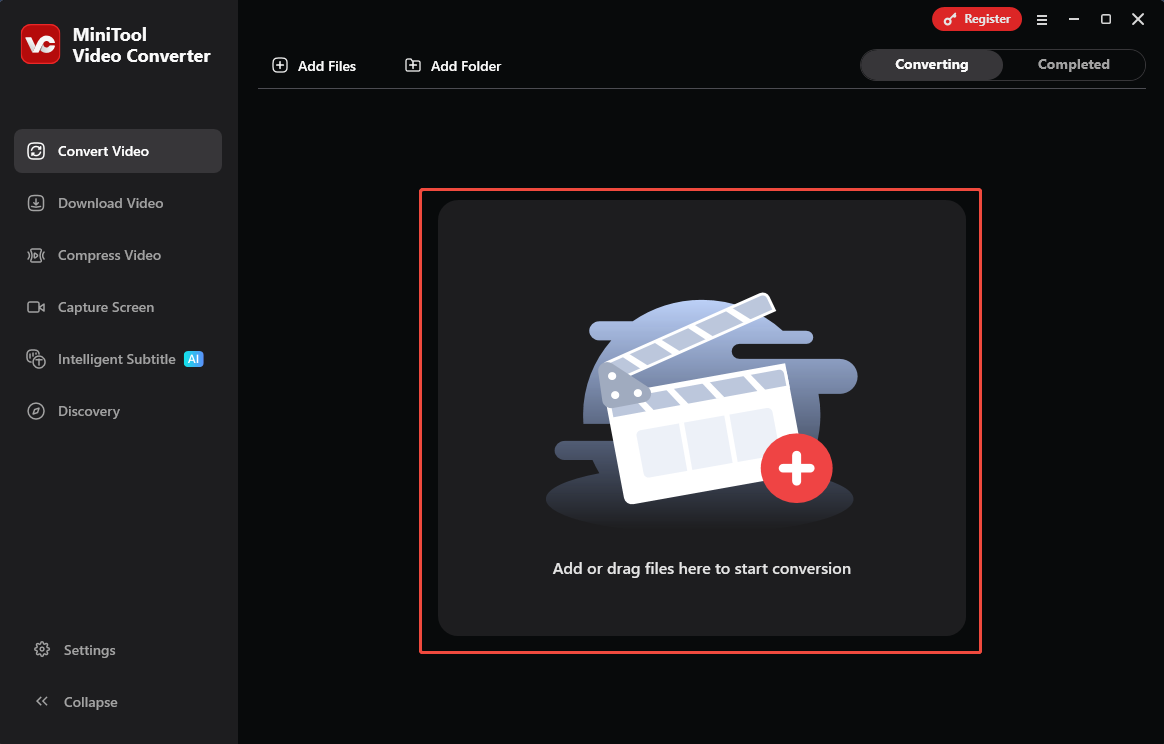
Drag the TRP video into the Add or drag files here to start conversion area to add it.
Step 3. Configure TS as the Output Format
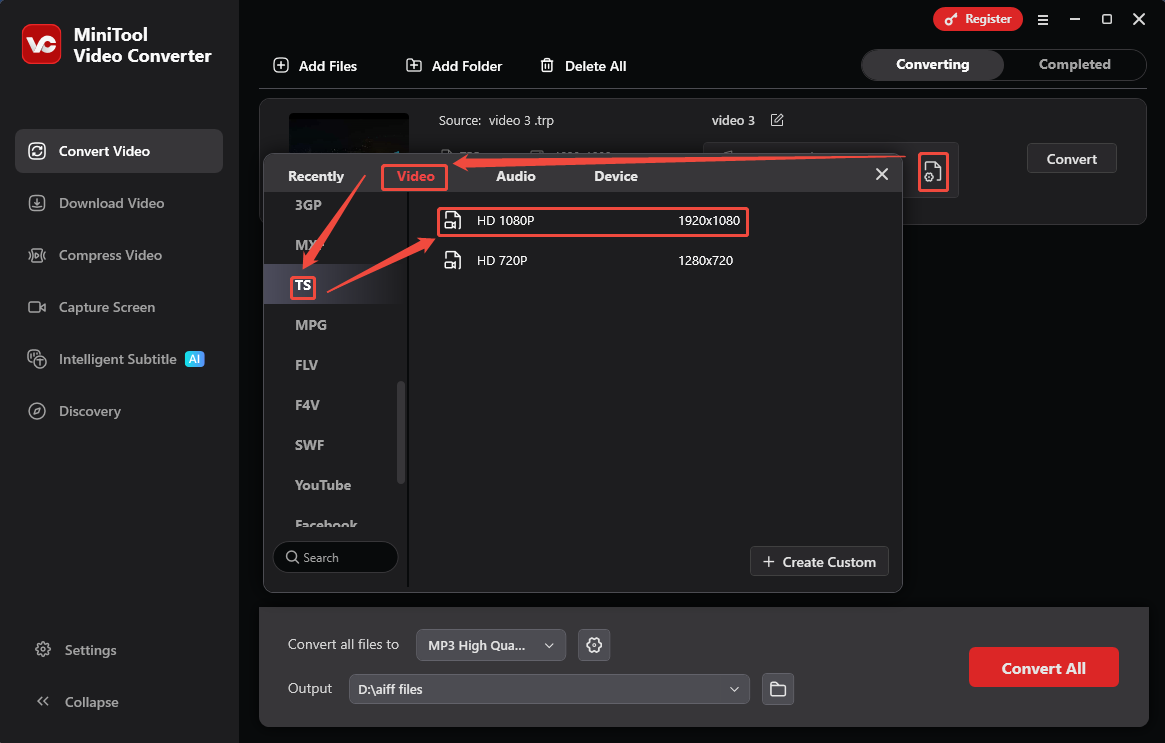
Click on the Gear icon to open the Output format window. Next, switch to the Video tab and choose the TS format in the left column. Then, select a resolution as needed.
Step 4. Start Conversion
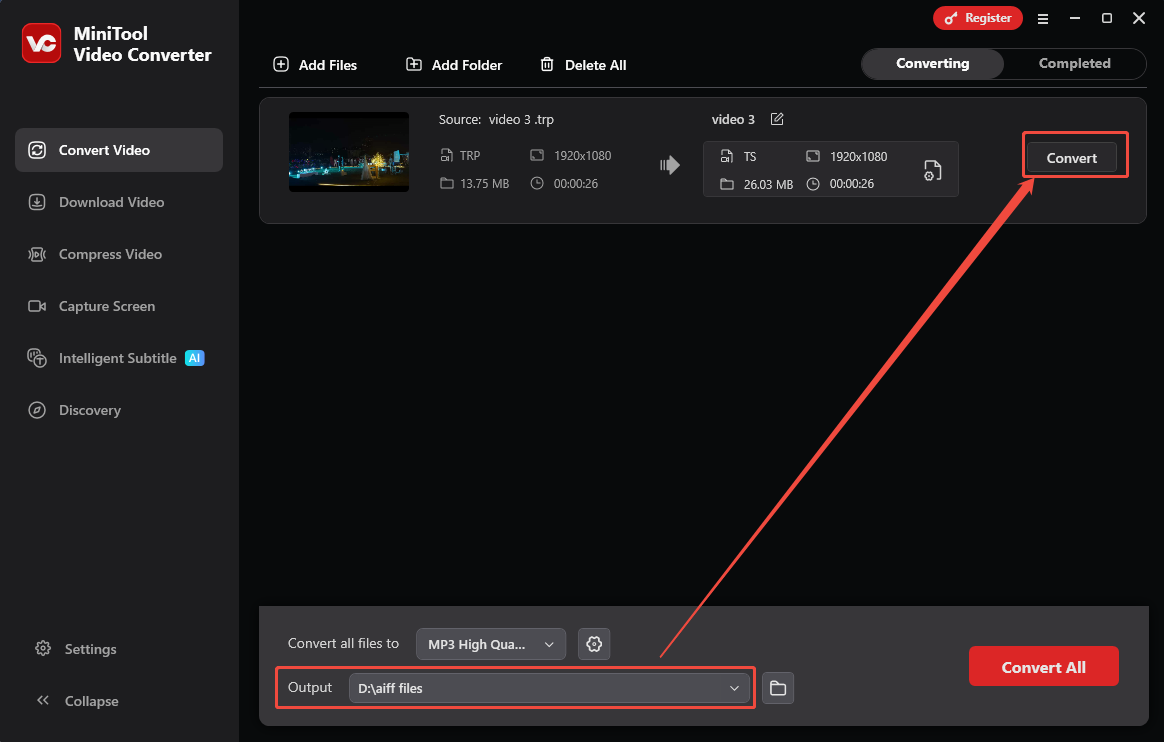
After setting TS as the output format, expand the Output option to pick a storage folder for the converted video. Then, click on the Convert button to start the conversion.
Step 5. Check and Find Your Converted Video
Once the conversion task finishes, the video converter will navigate you to the Completed tab. There, you can click on the Play icon or the Folder icon to check or locate the converted video.
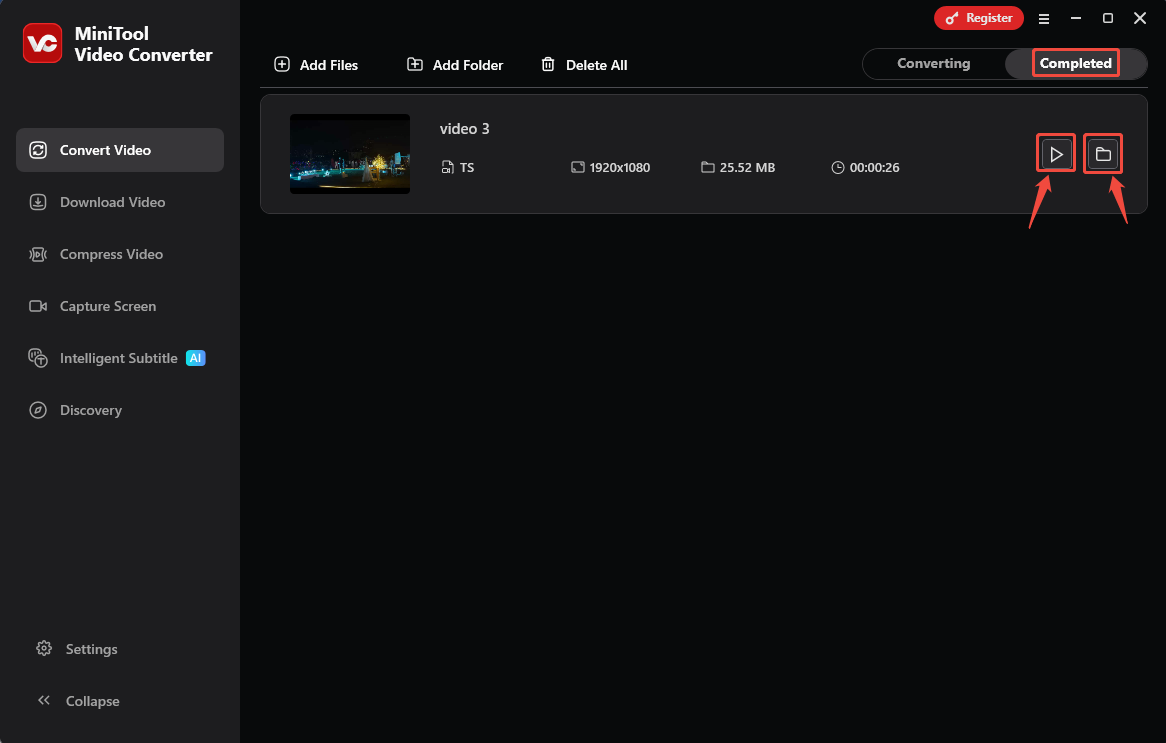
MiniTool Video Convert can quickly and easily convert TRP to TS.
2. Leawo Video Converter
Leawo Video Converter is a comprehensive desktop application that supports converting TRP to TS easily. It is capable of converting a series of formats, including TRP, TS, MP4, MKV, MOV, AVI, OGV, WebM, and more. The following section is how to convert TRP to TS with Leawo Video Converter.
Step 1. Obtain Leawo Video Converter
Download and install Leawo Video Converter. Then, choose the Video Converter option in the Home tab.
Step 2. Import the TRP Video
Click on the Convert tab, choose the Add Video option, and select Add Video to import the TRP video.
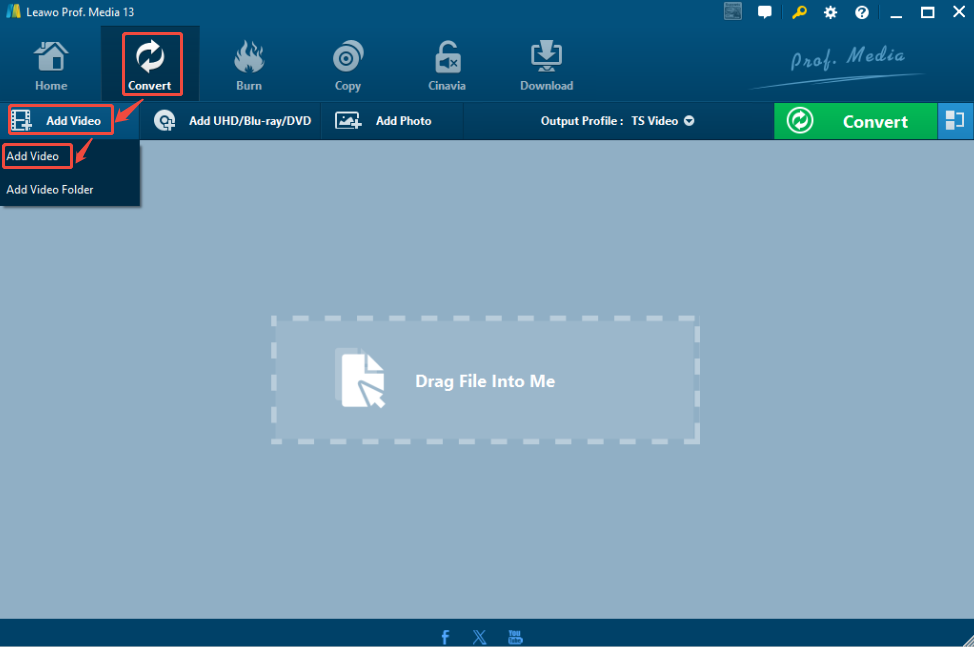
Step 3. Set the Output Format
Expand the Output Profile and choose TS. Then, click on the Convert option to open a dropdown list.
Step 4. Begin the Conversion
Expand the Save to option to specify a saving path. Next, agree to and activate the conversion of only 5 minutes of content. Then, click the Convert button to begin the conversion. After the conversion ending, click on the Folder icon to check the converted video.
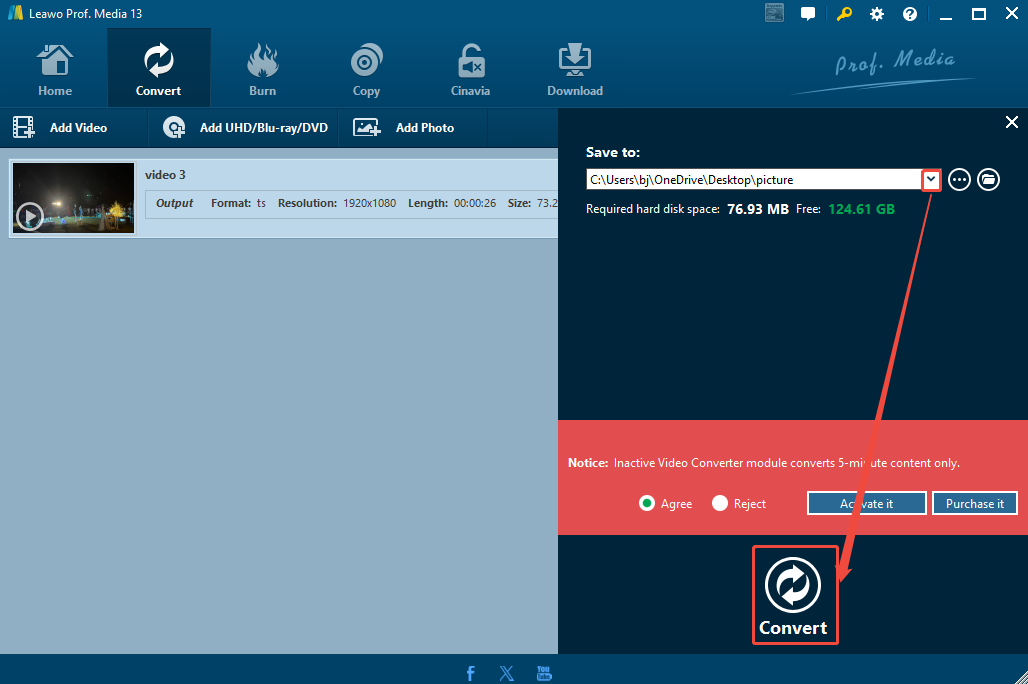
Leawo Video Converter is a can’t miss TRP to TS converter.
3. Media.io
Media.io is a browser-based converter. It supports more than 45 formats, which contain TRP and TS. Furthermore, it also allows you to batch convert videos and audio. However, Media.io only enables you to upload videos that are smaller than 2GB. Now, let’s convert TRP to TS with Media.io.
Step 1. Go to Media.io and Log in to It
Navigate to https://www.media.io/convert/trp-to-ts.html and log in to this website.
Step 2. Upload the Target Video
Click on the Click To Upload region to upload the target video.
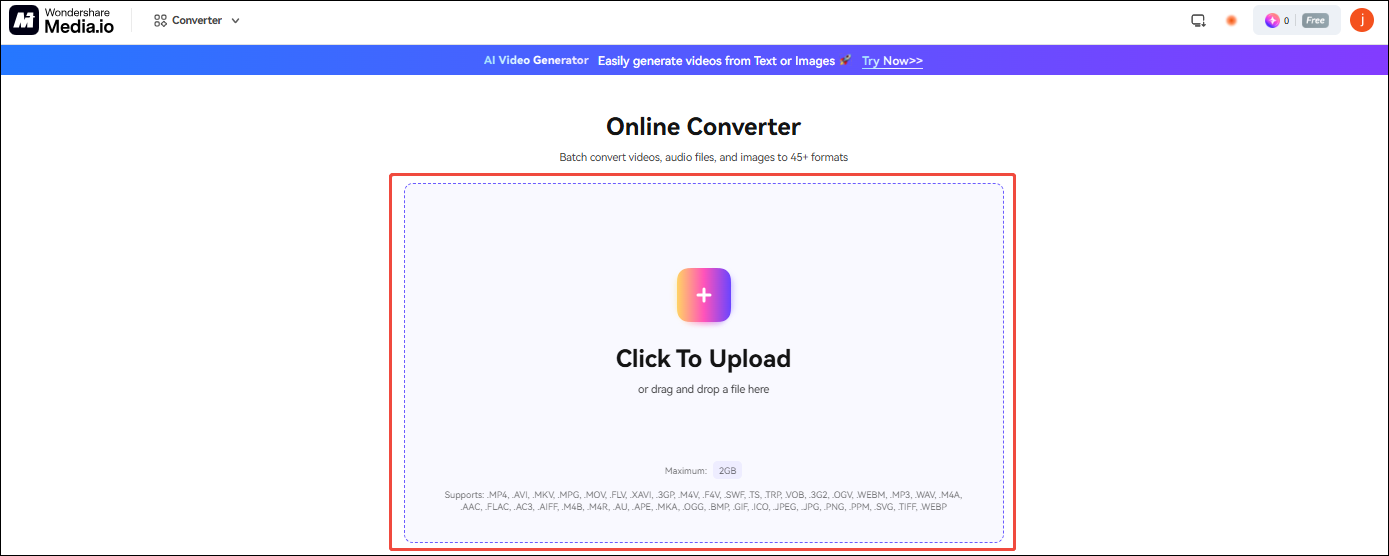
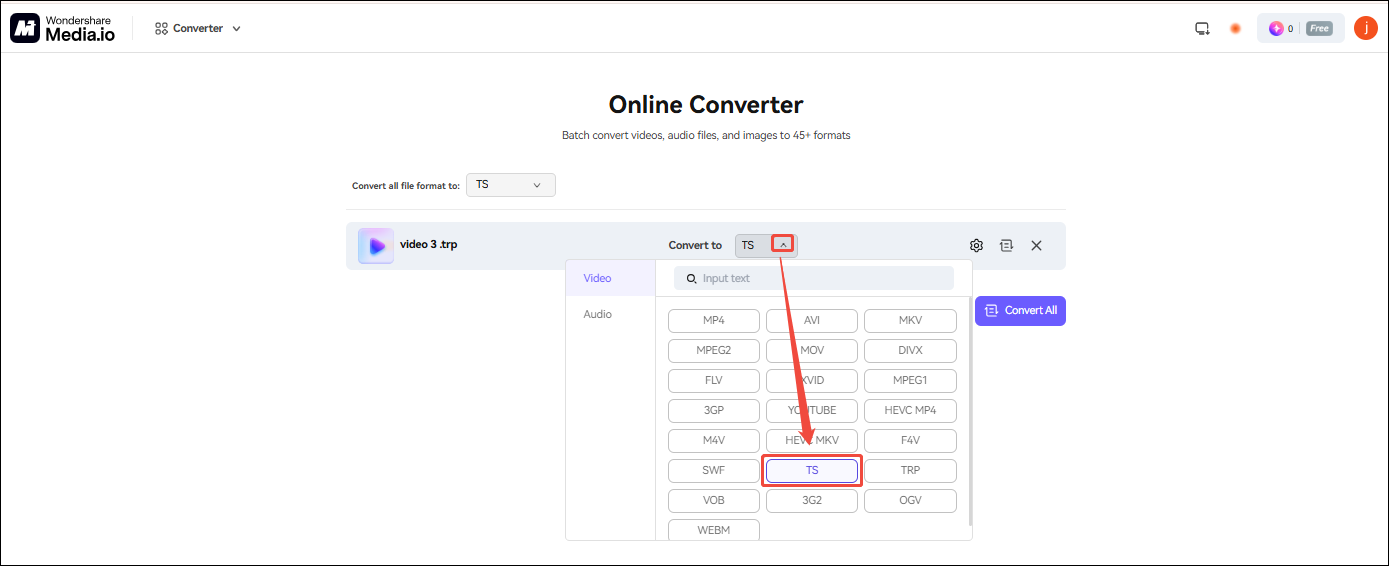
Step 3. Set TS as the Converted Video
Expand the Convert to option to set TS as the converted video.
Step 4. Start Converting
Click on the Convert button to start the conversion. When the conversion finishes, click on the Download button to store the converted video.

Media.io makes the TRP to TS conversion efficient.
4. Movavi Video Converter
Movavi Video Converter is an easy-to-use online video converter. It supports converting various formats, including TRP and TS. Movavi Video Converter also allows you to customize the resolution and video quality. Let’s take a look at how to convert TRP to TS with Movavi Video Converter.
Step 1. Navigate to Movavi Video Converter’s Webpage
Visit https://www.movavi.com/video-converter/ to open Movavi Video Converter’s webpage.
Step 2. Import and Set Output Format
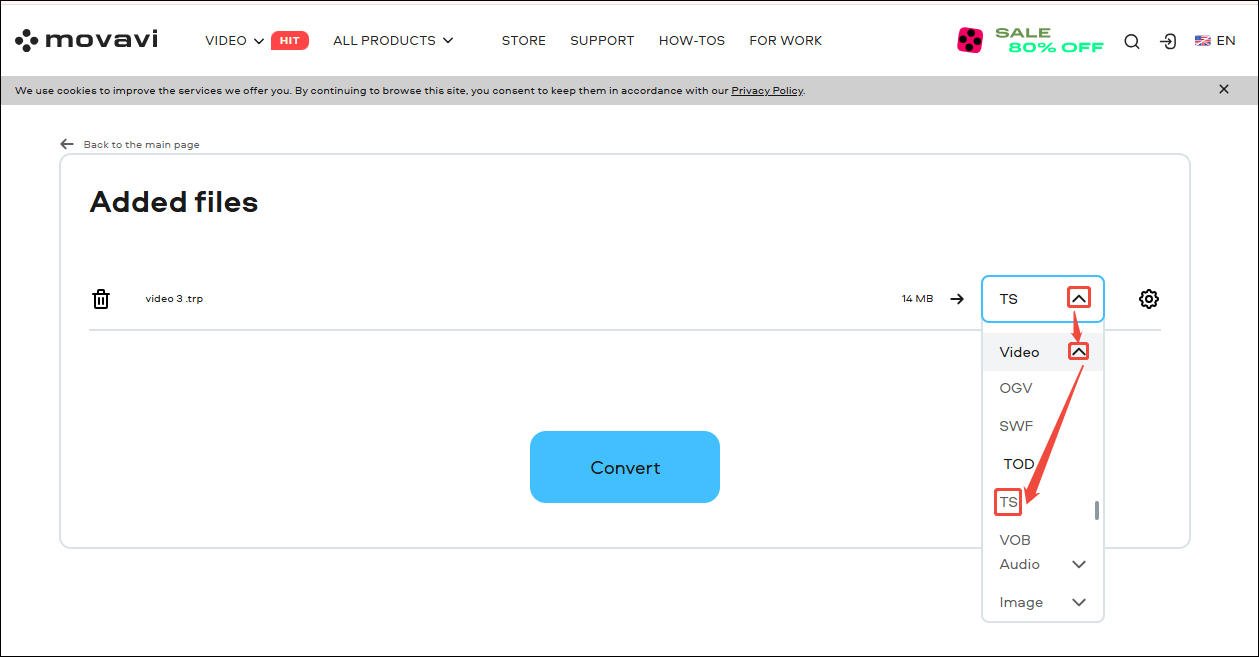
Click on the + Add Your Media option to upload the TRP video. Then, expand the Convert to option to choose TS.
Step 3. Convert and Download the Converted Video
Click on the Convert button to start the conversion. Then, click on the Download button to save the converted video.
In the online converters, Movavi Video Converter is worth a try.
Final Words
To convert TRP to TS, this article introduces four converters worth trying, including two desktop converters: MiniTool Video Converter and Leawo Video Converter. It also recommends two online converters: Media.io and Movavi Video Converter. You can choose them according to your needs.
If you have any problems when using MiniTool Video Converter, please send an email to support@minitool.com to ask for help. Also, you can directly send me a message on X. I will help you as quickly as possible.
User Comments :