

AAC (Advanced Audio Coding) is a lossy digital audio format. It is capable of delivering superior audio quality at lower bitrates. Consequently, many music platforms and game consoles, such as Apple Music and PlayStation, have adopted this format. Compared to MP3, AAC offers better sound quality for the same file size, which is why it is so widely used.
3GP is a streaming media container format designed specifically for 3G mobile devices. It is well-suited for use in low-bandwidth cellular network environments. 3GP was commonly found on older mobile phone models, which utilized this format to store video files. Although 3GP is no longer widely used today, you can still play 3GP files using software such as VLC Media Player, Windows Media Player, and QuickTime.
If you wish to make high-quality audio compatible with older mobile devices (such as BlackBerry and Nokia) or low-bandwidth network environments, you need to convert AAC to 3GP.
How to Convert AAC to 3GP?
When converting media formats, I prioritize speed and simplicity above all else. MiniTool Video Converter perfectly meets both of these needs. It is an audio and video converter with a simple interface that supports a wide range of formats, including AAC, 3GP, MP4, MKV, AVI, WMV, MOV, M4V, MP3, WAV, M4A, WMA, and more. It meets virtually all of my conversion needs!
Importantly, MiniTool Video Converter allows you to adjust parameters, such as resolution, frame rate, sample rate, and bitrate, in the encoder configuration. Furthermore, I discovered that the videos it exports are watermark-free. I had previously used various free converters to convert videos, only to find that the resulting files contained watermarks. Therefore, I believe MiniTool Video Converter handles this aspect exceptionally well.
Additionally, MiniTool Video Converter can convert multiple videos simultaneously. It supports converting up to five files at once, making it ideal for users with batch conversion needs.
Now, you can refer to the steps below to convert AAC to 3GP with MiniTool Video Converter:
Step 1: Install MiniTool Video Converter
Click the download button below to get MiniTool Video Converter installed with one click.
MiniTool Video ConverterClick to Download100%Clean & Safe
Step 2: Import Your AAC File
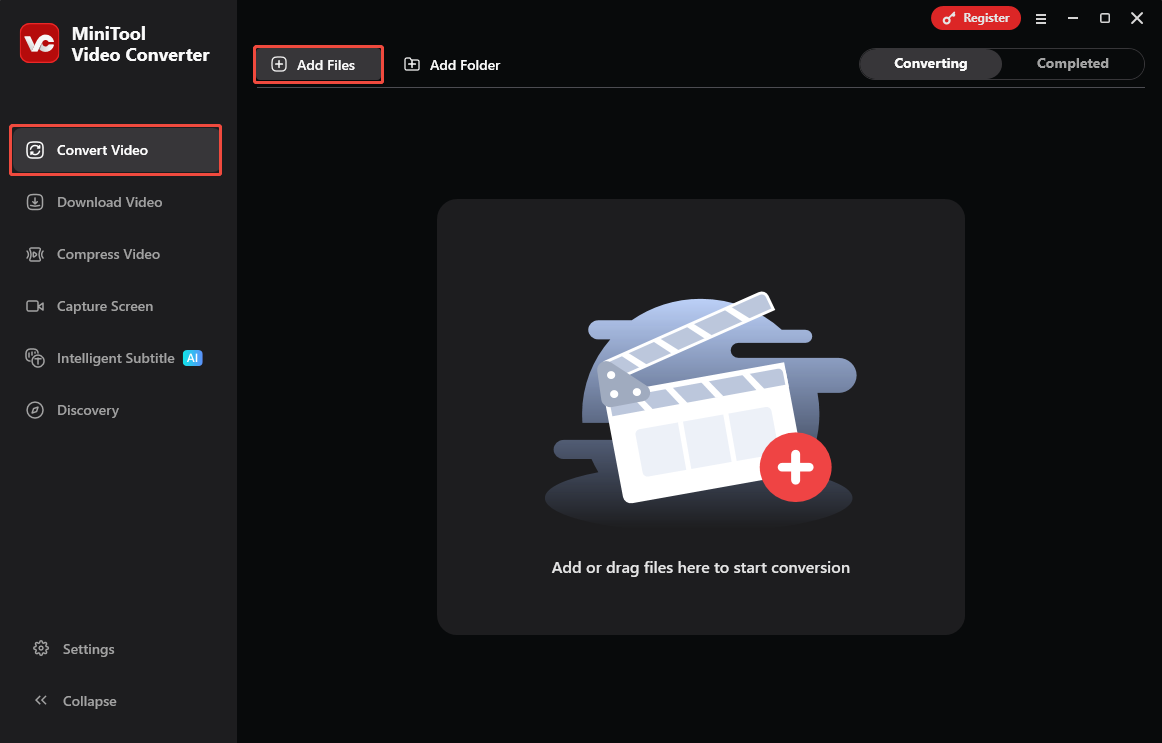
Launch this free converter to go to the Convert Video tab. Then, I click Add Files to upload the AAC file.
Step 3: Choose Exported Format
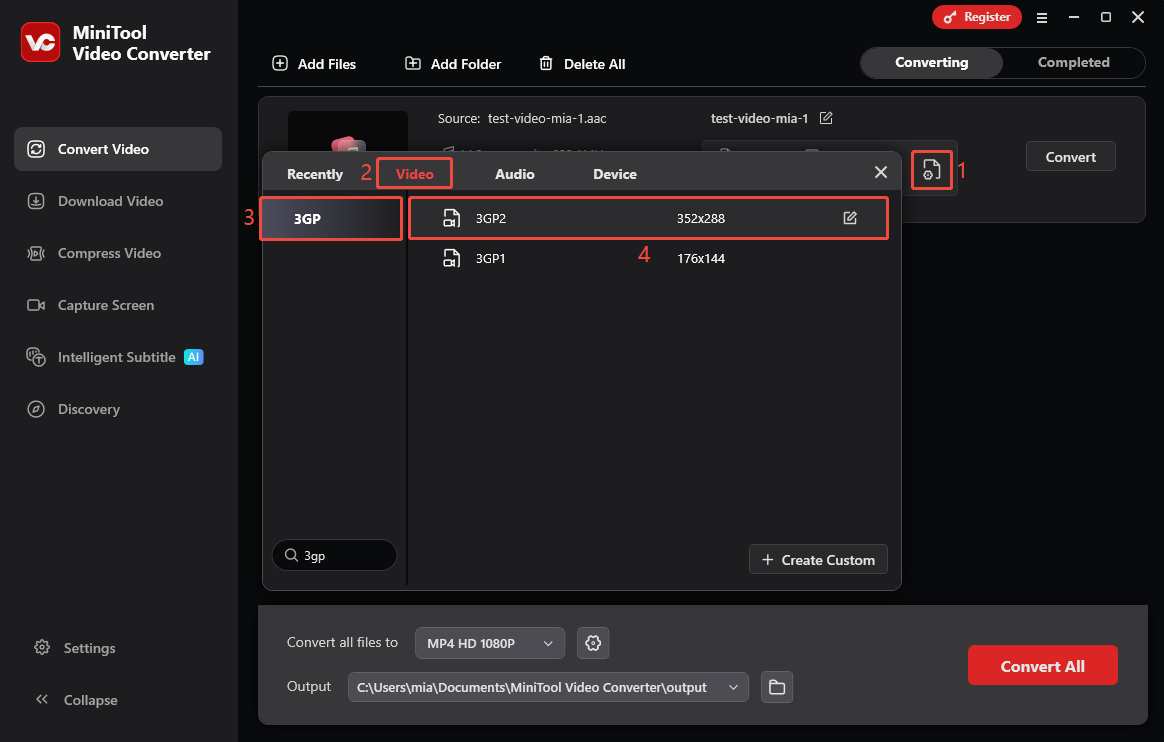
To set the 3GP as the output format, I open the output format window by clicking the gear icon. Then, choose the Video tab, select 3GP in the left menu, and then choose the video quality. You can configure it the same way.
Step 4: Choose Save Location
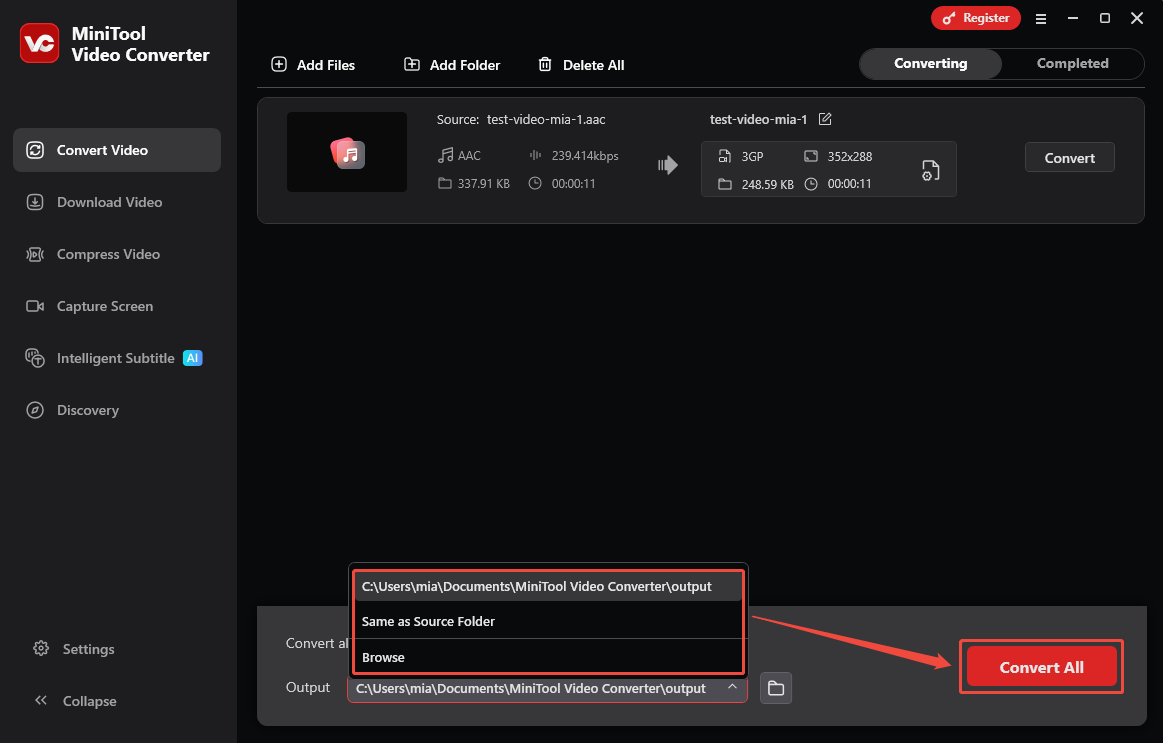
At the bottom of the interface, I expand the Output option and select a folder to save my converted files.
Step 5: Start Conversion
Then, I click the Convert All option to start the conversion.
Step 6: Locate the Converted File
Once the conversion is complete, the interface will automatically switch to the Completed tab. Here, I can view the tasks that have finished converting. I can click the play icon to check if the file has been converted correctly or click the folder icon to locate its save location.
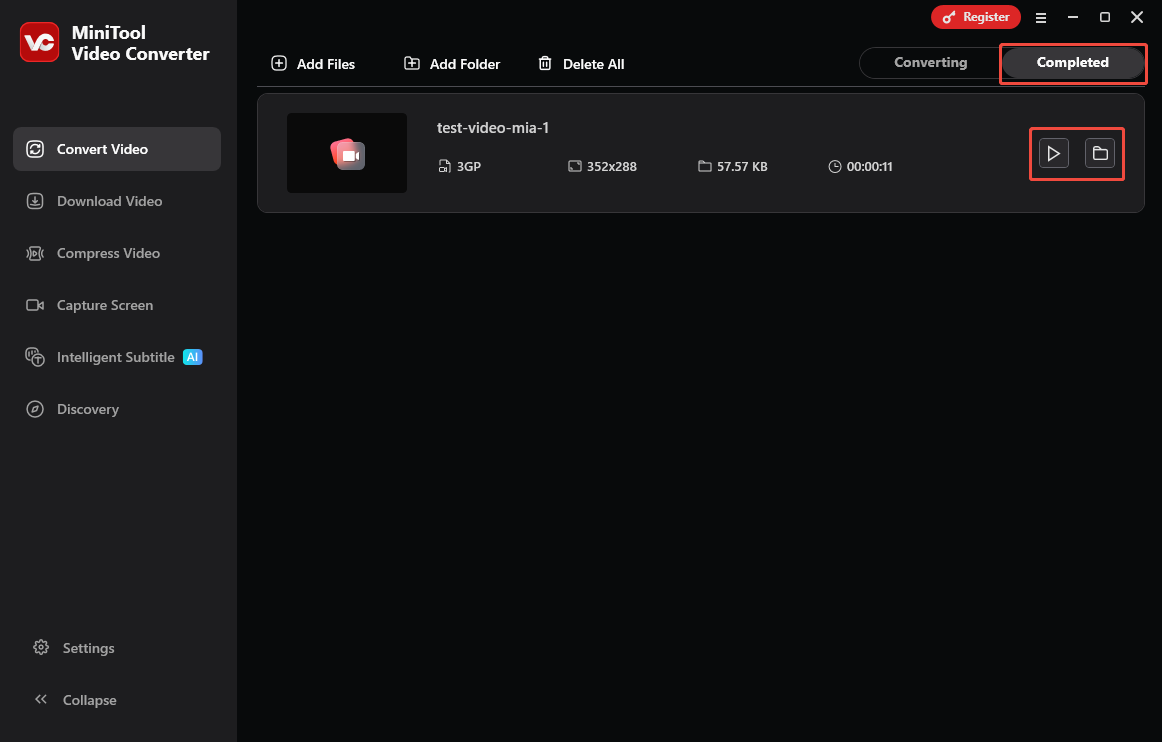
After converting AAC to 3GP, you can continue to refer to the above methods to convert other files.
Is MiniTool Video Converter Safe to Use?
Yes, MiniTool Video Converter is completely safe to use! As long as you download the software directly from the official MiniTool website or via the download buttons provided in this article, you will not encounter any annoying advertisements, bundled software, or unnecessary add-ons.
Furthermore, MiniTool Video Converter has undergone rigorous testing and verification. It contains absolutely no security threats such as malware, spyware, or viruses. You can download, install, and use it with complete peace of mind.

AAC vs 3GP: Which One Is Better?
In terms of audio quality, device compatibility, and compression efficiency, AAC far surpasses the 3GP format. For most modern use cases, I strongly recommend converting 3GP files to AAC format to enjoy a clearer, richer audio experience that also occupies less storage space.
However, in certain specific situations, 3GP may be the superior choice. If you need to play videos on older mobile phones from the early 2000s, or if you intend to send audio files via MMS (Multimedia Messaging Service), then the 3GP format is the better option. This is because the 3GP format was originally designed for cellular mobile network environments with extremely limited bandwidth.
Will AAC to 3GP Conversion Reduce Audio Quality?
Converting AAC to 3GP does indeed result in a reduction in audio quality. During the conversion process, the audio file is re-encoded, leading to the loss of some audio data. The 3GP format itself is designed to conserve storage space at the expense of sound quality; consequently, the resulting 3GP file may exhibit slightly inferior audio quality compared to the original AAC file.
Conclusion
For those who want to play AAC audio on an older mobile phone, converting AAC to 3GP is a viable option. This article recommends using MiniTool Video Converter for this task. Not only does this tool offer fast conversion speeds, but it also produces watermark-free results.
User Comments :