

Is there any method that can convert MKA to AVI? Of course! This article shows 2 effective video-to-audio conversion tools, including the desktop MiniTool Video Converter and the online ezyZip. After converting to AVI, you can add more elements to this converted video.
How to Convert MKA to AVI
How can I convert MKA to AVI to be compatible with more devices or players? The following enhanced audio-to-video converter you can’t miss.
- MiniTool Video Converter
- ezyZip
How to easily and quickly convert MKA to AVI? Both of the above converters have standard conversion steps.
- Access the audio-to-video converter or go to the online conversion page
- Import an MKA audio file
- Set AVI as the video format
- Start the conversion process
- Check or save the converted video
#1 MiniTool Video Converter
MiniTool Video Converter is an ideal MKA to AVI converter. It also allows you to convert other audio to videos, such as MP3 to WMV, OGG to MOV, and more. Below is a detailed guide on how to convert MKA to AVI using MiniTool Video Converter.
1. Get MiniTool Video Converter
Obtain MiniTool Video Converter. Then, run this application.
 MiniTool Video Converter
-
 Batch convert video/audio files among 1000+ formats.
 - Quickly compress videos for easy storage and transfer.
- Accurately extract subtitles from video/audio files.
- Effectively enhance video quality.

2. Import the MKA File
Click on the Add Files option in the default Convert Video tab to import the MKA file.
3. Set AVI as the Output Format
On the imported conversion task, click on the Gear icon at the bottom to open the output format window. There, go to the Video tab and choose AVI. Then, select a desired resolution option, such as HD 1080P.
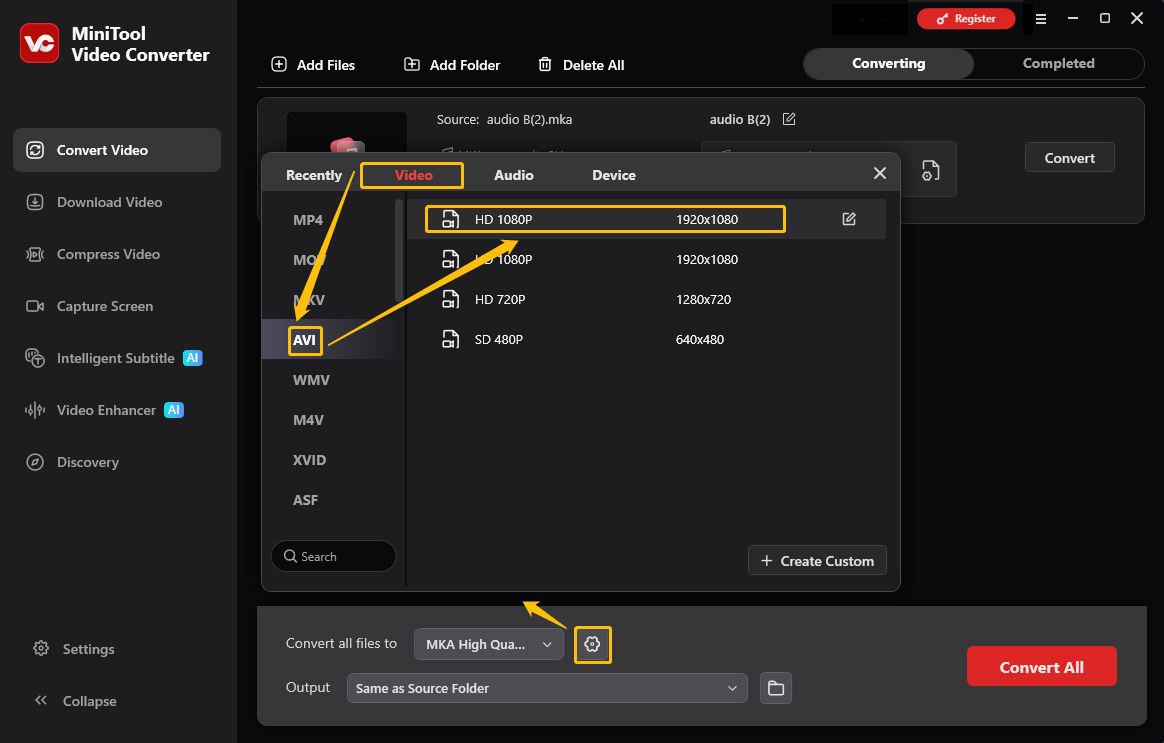
4. Start the Conversion
Before proceeding with the MKA to AVI conversion, expand the Output option to configure the target storage location for the converted audio. Afterward, initiate the conversion by clicking the Convert button.
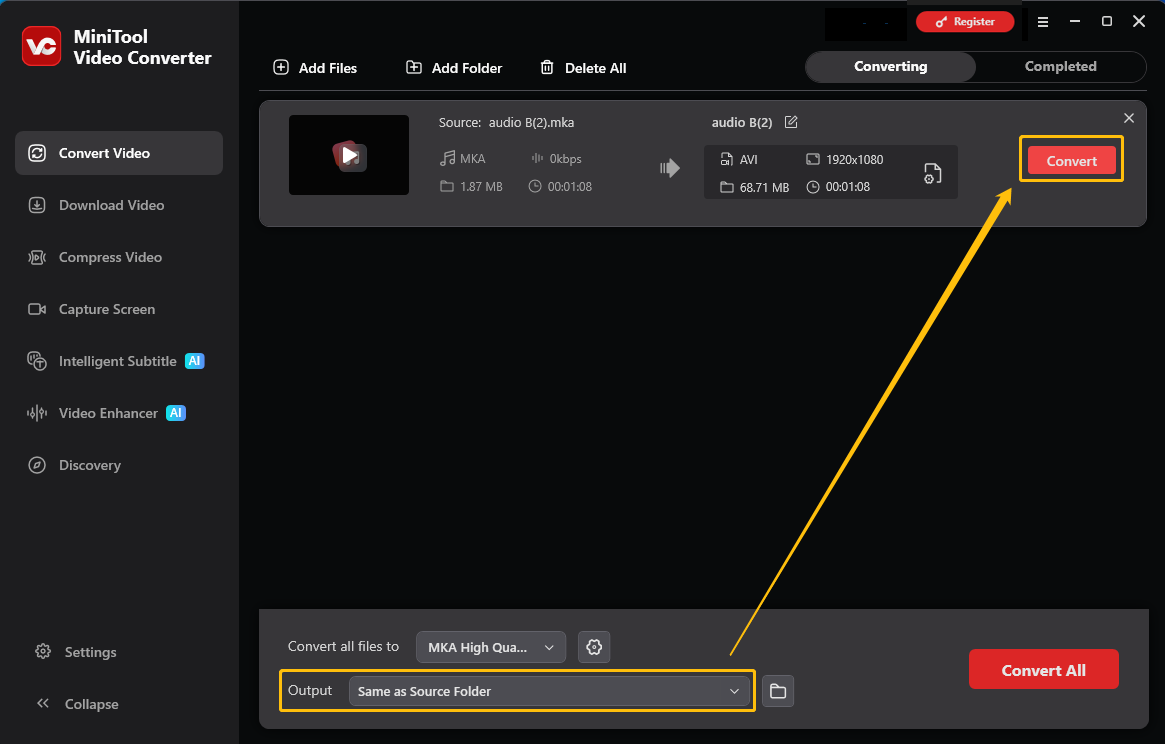
5. Check and Locate the Converted Audio
Once the conversion ends, the converted video file will land on the Completed tab. Here, click on the Play icon to check it. Or click on the Folder icon to locate the converted video on the PC.
MiniTool Video Converter makes it convenient to customize the bitrate and sample rate. Besides, it also supports batch conversion of up to 5 tasks.
#2 ezyZip
ezyZip is a reliable video-to-audio converter. It supports converting MKA to AVI. Moreover, this online converter enables you to import audio from local folders or Dropbox. The following steps are how to do this conversion.
1. Go to https://www.ezyzip.com/convert-mka-to-avi-online.html to visit the MKA to AVI conversion page.
2. Click on the Select MKA file to convert option to upload an MKA file.
3. Click the Convert to AVI button and choose a saving path to begin converting.
4. Click the Save AVI File button to download the converted video.

ezyZip also supports converting M4A, WebM, FLAC, M4R, OGG, ALAC, and more. This practical converter is secure and user-friendly.
AVI vs MKA
What are the differences between AVI and MKA? Take an overview of the following table.
| MKA | AVI | |
| Compatibility | Low | High |
| Video Editing | Hard | Easy |
| Future Upgrades | Audio only | Subtitles or pictures |

1. Compatibility
Many older car stereos and DVD players cannot recognize MKA, a relatively new and niche audio format. AVI, on the other hand, is a globally recognized standard, once very popular, and can be played perfectly on almost any older hardware or device.
2. Video Editing
Importing MKA into older editing software and players may result in no response. However, AVI is accepted immediately by any editing software, especially older versions.
3. Future Upgrades
MKA is a pure audio container format with only a single audio track and cannot contain any visual elements. You can easily add background images, scrolling text, or lyrics to AVI later.
Why Convert MKA to AVI
- Improved compatibility with devices and software.
- Easy multimedia editing and publishing.
- Freeing up space for future visual upgrades.
Conclusion
This article shares how to convert MKA to AVI with 2 excellent video converters, including MiniTool Video Converter and ezyZip. It also compares the 2 formats in terms of compatibility, video editing, and future upgrades.
If you have any questions or suggestions about MiniTool Video Converter, feel free to contact MiniTool via email at suppot@minitool.com.
User Comments :