

How to Convert M4B to FLAC
Fast steps:
- Open a converter. (MiniTool Video Converter or CloundConvert)
- Import the M4B file to the converter.
- Set the output format.
- Click Convert to start conversion.
Option 1: Use MiniTool Video Converter
MiniTool Video Converter works as an M4B to FLAC converter with customizable output settings, including the audio encoder, channel, bitrate, sample rate, and other parameters.
Besides M4B and FLAC, this software also supports a wide range of other formats, including MKA, OGG, ALAC, AAC, MKV, WMV, WebM, MP4, and more.
Here is how to use MiniTool Video Converter to convert M4B to FLAC.
1. Open MiniTool Video Converter.
Download and install this video converter on your PC, then launch the program.
 MiniTool Video Converter
-
 Batch convert video/audio files among 1000+ formats.
 - Quickly compress videos for easy storage and transfer.
- Accurately extract subtitles from video/audio files.
- Effectively enhance video quality.
2. Add the M4B file.
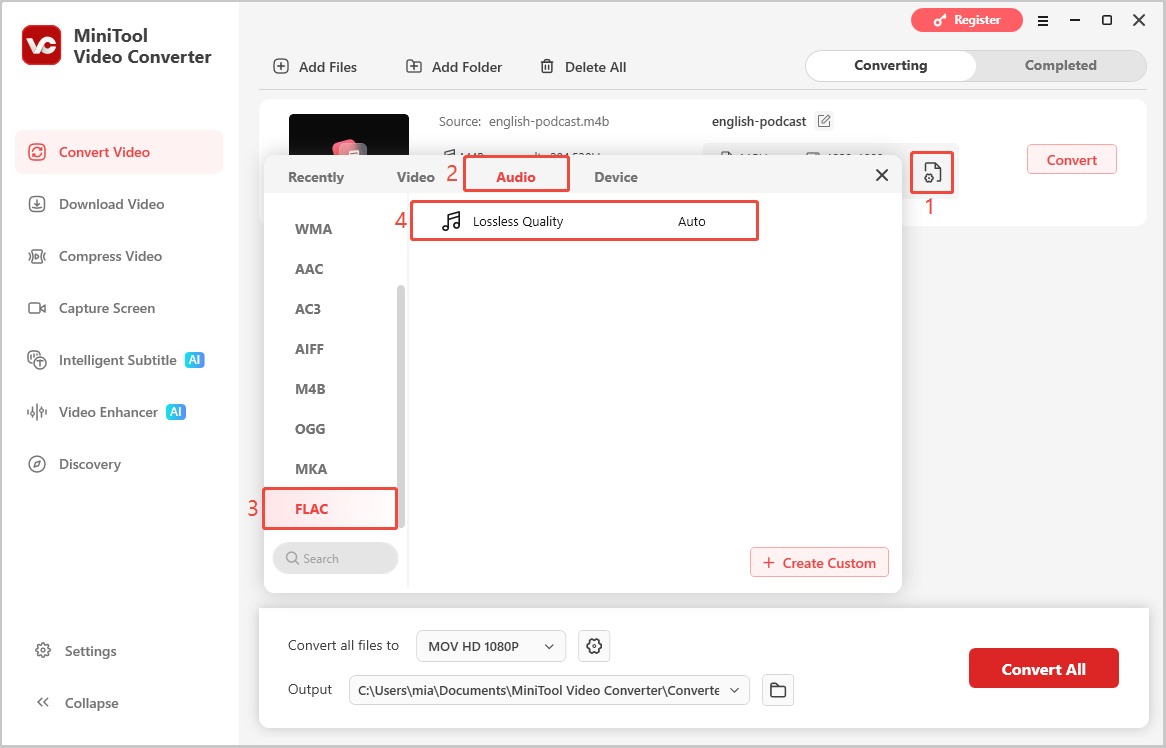
Under the Video Convert tab, click Add Files to import the M4B audio file.
3. Set FLAC as the output format.
Click the gear icon next to the imported file, select Audio > FLAC in the output format window, and choose the preferred audio quality.
4. Select the output folder.
Expand the Output menu and choose a folder for saving the converted FLAC file.
5. Convert M4B to FLAC.
Click Convert to start the conversion process.
6. Check the FLAC file.
Once the conversion is finished, open the Completed tab and click the folder icon to locate the converted FLAC file.
Option 2: Use CloudConvert
CloudConvert is a popular online conversion tool that supports more than 200 formats, including audio, video, documents, ebooks, images, spreadsheets, and archives. However, its free plan limits the number of conversions available each day.
How to convert M4B to FLAC with CloudConvert? Here is a guide.
1. Go to the conversion page.
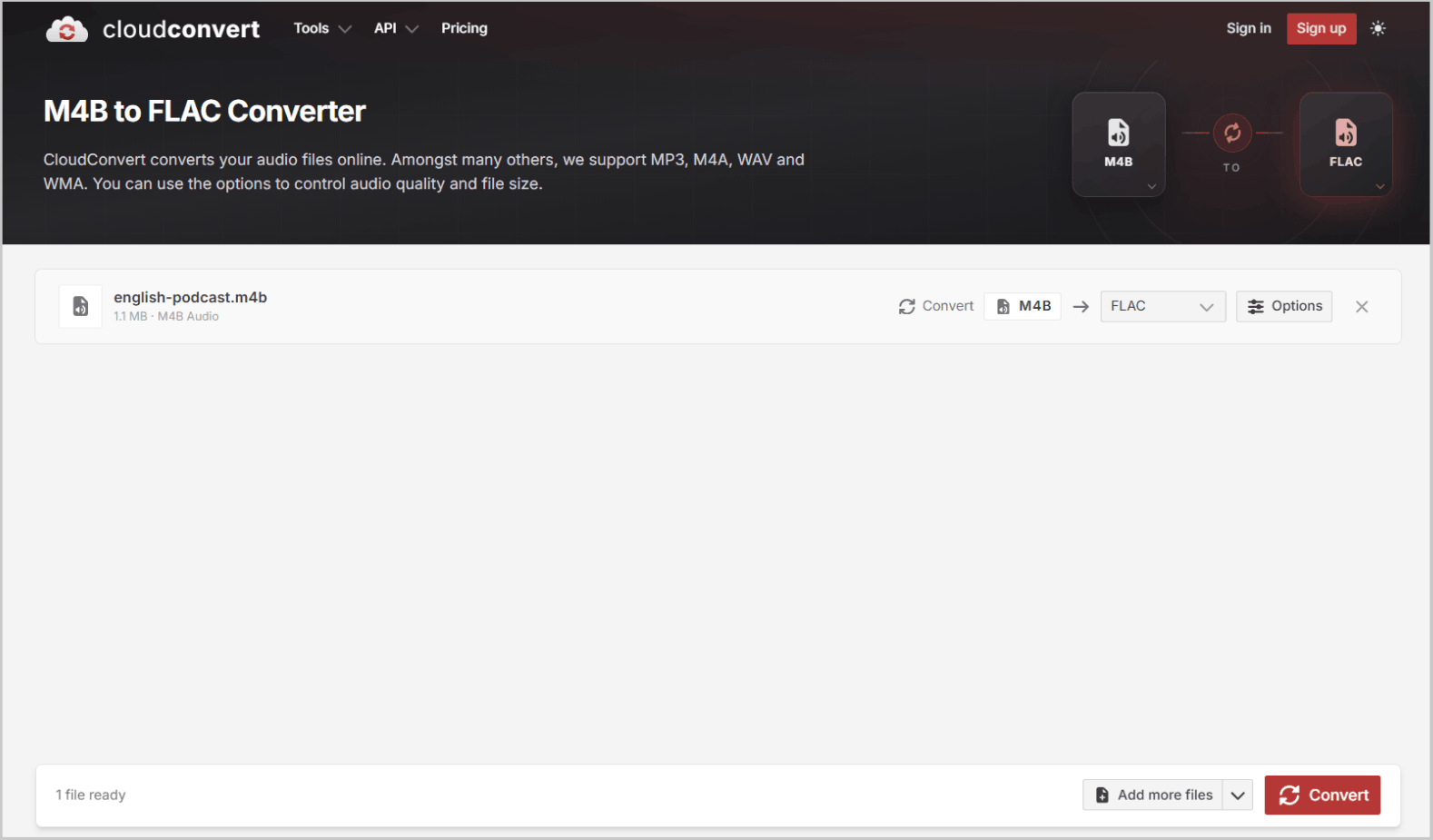
Visit https://cloudconvert.com/m4b-to-flac.
2. Import an M4B file.
Click Select File and select the M4B file.
3. Start conversion.
Click the Convert option to start conversion.
4. Download the file.
Click the Download option to save the FLAC file.
M4B vs FLAC
What are the main differences between M4B and FLAC? The table below provides a quick comparison of their audio quality, file size, typical uses, DRM support, and compatibility.
| M4B | FLAC | |
| Audio Quality | Codec-dependent | Lossless |
| File Size | Small | Large |
| Application | Audiobooks | Music |
| DRM | Supported | Not supported |
| Compatibility | Limit | Wide |
1. Audio Quality
Whether an M4B file or a FLAC file has higher audio quality depends on the codec and compression method used.
FLAC uses lossless compression, which typically ensures good audio quality. However, when M4B files use lossy codecs such as AAC, some audio information is lost during encoding. In this case, the quality of M4B is lower than that of FLAC.
2. File Size
M4B files are typically smaller than FLAC files because they often use lossy codecs such as AAC. In contrast, FLAC uses lossless compression to preserve all audio details, resulting in larger files without compromising the original audio quality.
3. Application
FLAC has a wider range of applications overall. M4B is primarily used for audiobooks, while FLAC is mainly used for storing and playing high-quality music.
M4B can store audiobook chapters, covers, and other relevant metadata for easy browsing and playback. FLAC, due to its lossless compression, offers better sound quality and is therefore more suitable for music libraries.
4. DRM Support
The biggest difference between M4B and FLAC is that M4B can be used for audiobooks protected by DRM (Digital Rights Management), while FLAC typically does not support DRM.
DRM is a technology used to protect digital content from unauthorized copying, sharing, or use. Because some M4B files are used for audiobooks, DRM technology is used to protect copyright. FLAC, however, does not use this technology.
5. Compatibility
Compared to M4B, FLAC generally has better compatibility. M4B is widely supported by audiobook applications and Apple devices, while FLAC is widely supported by music players and audio software, but support may be limited on some devices.
When to Convert M4B to FLAC
- Suitable for long-term storage
- Suitable for audio editing
- Better compatibility
1. Suitable for long-term storage: Compared to M4B, the FLAC format is better suited for long-term audio storage due to its lossless nature; converting FLAC files to other audio formats incurs no additional loss in sound quality.
2. Suitable for audio editing: FLAC is widely supported by various audio editors and digital audio workstations (DAWs), making it easy to cut, split, or process audio.
3. Better compatibility: FLAC offers superior compatibility compared to M4B. If a specific player or audio software does not support the M4B format, M4B files can be converted to FLAC.
When to Keep M4B
- Preserving chapters and resume position
- For smaller file size
- For compatible audiobook apps
- When the original quality is sufficient
1. Preserving chapters and resume position: M4B supports audiobook features such as chapters, cover art, and metadata, while FLAC does not. If you wish to retain this information, it is best not to convert to FLAC. (Alternatively, you can convert M4B to M4A to preserve chapter tracks.)
2. Smaller file size: M4B files compressed using AAC are generally smaller than FLAC files. So, M4B is the better choice if you want to save storage space.
3. For compatible audiobook apps: M4B works well with many audiobook players and apps that support its features.
4. When the original quality is sufficient: Converting M4B to FLAC will not improve the sound. So, if the M4B already provides good audio quality, you don’t need to convert it to FLAC.
Conclusion
Convert M4B to FLAC when you need lossless quality and wider device support, but keep M4B to preserve chapters, save storage space, and maintain audiobook functionality. Choose the option that matches your workflow.
If you have any questions about using MiniTool Video Converter, please email support@minitool.com for assistance.
User Comments :