

This article compares DAV and AFS and explains why to convert DAV to ASF in terms of usage, compatibility, and codec. It also introduces how to use 2 practical converters, including iDealshare VideoGo and ConvertHelper.
DAV Explained
DAV is a proprietary video format developed by Dahua Technology. It is primarily used in CCTV (Closed-circuit Television) monitoring systems. DAV features high privacy. It is recorded by CCTV monitoring devices and stored in an encrypted form. Therefore, it can’t be decoded and played by mainstream media players on Windows. DAV can be compatible with players, such as DSD304, DVR365, DSD308, and DSD316 DVR.
ASF Explained
ASF (Advanced Systems Format) is an open-source digital video and audio container format proprietary by Microsoft. This format doesn’t specify the video and audio codecs. ASF is also designed for streaming media.
Besides, ASF is compatible with various digital media servers, HTTP servers, and local storage devices. ASF contains not only video and audio content but also metadata.
DAV vs ASF: Differences
What are the differences between DAV and ASF? I will compare them from their usage, compatibility, and codecs.
#1 Usage
ASF is a common streaming media and Windows system media format. On the other hand, DAV is specifically used for CCTV and surveillance.
#2 Compatibility
DAV is typically only compatible with certain specialized and privacy-critical devices, such as DSD304 and DVR365. ASF has a range of compatibility with players, including VLC Media Player and Windows Media Player.
#3 Codec
ASF doesn’t use a fixed codec. However, it is often encoded with Windows Media Video or Windows Media Audio codecs. Due to DAV content having access restrictions, it usually adopts an MPEG-4 compression codec with encryption features. Also, DAV uses H.264 or H.265 video codecs.
Why Convert DAV to ASF
To play your recorded surveillance videos on Windows systems or many popular media players, you can convert DAV to ASF for better compatibility. In addition, ASF is a format native to online streaming and transmission. Converting DAV to ASF is well-suited for playback, sharing, and storing online.
How to Convert DAV to ASF
Have learned the 2 formats and the conversion reasons above. Need a DAV to ASF converter? There are 2 tools I would like to recommend.
1. iDealshare VideoGo
iDealshare VideoGo is a versatile media file processing tool. It allows you to easily and quickly convert DAV to ASF. Besides, iDealshare VideoGo allows you to adjust the video size, video quality, and audio quality for the converted videos.
What’s more, iDealshare VideoGo prepares advanced settings to change the converted videos’ properties, such as video and audio codecs, bitrates, sample rates, and more. Next, let’s convert DAV to ASF with iDealshare VideoGo.
Step 1. Get iDealshare VideoGo
Download and install iDealshare VideoGo from the official website. Then, launch it and close the registration window.
Step 2. Add DAV File
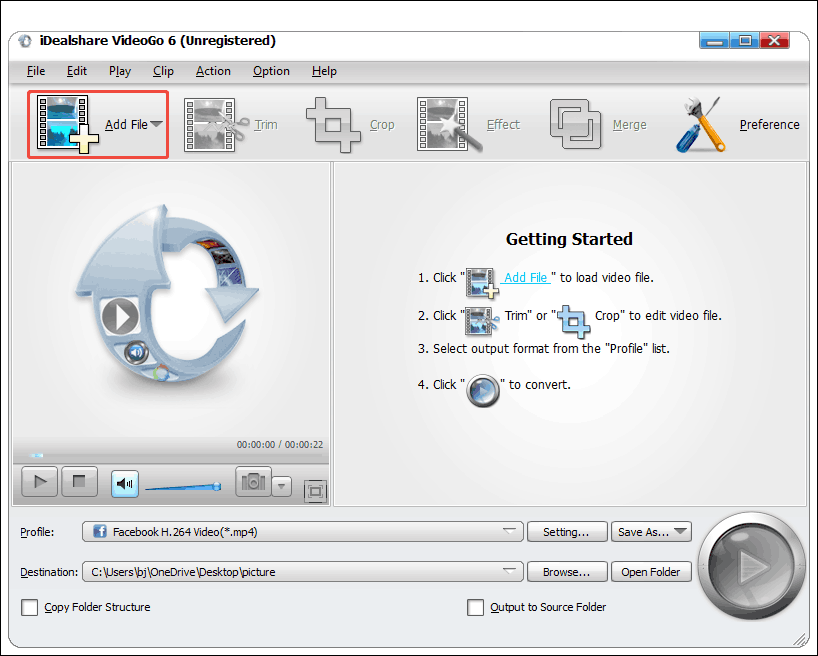
In the iDealshare VideoGo’s main interface, click on the Add File option to add a DAV file.
Step 3. Specify ASF as the Output Format
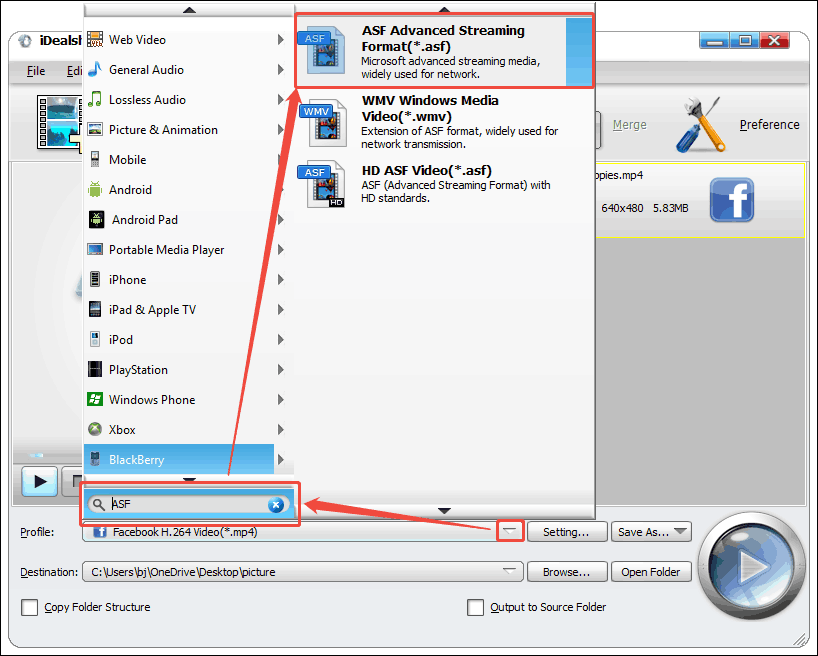
After importing the DAV file, expand the Profile option and enter ASF in the search bar. Then, choose the ASF Advanced Streaming Format(*.asf) option.
Step 4. Start the Conversion
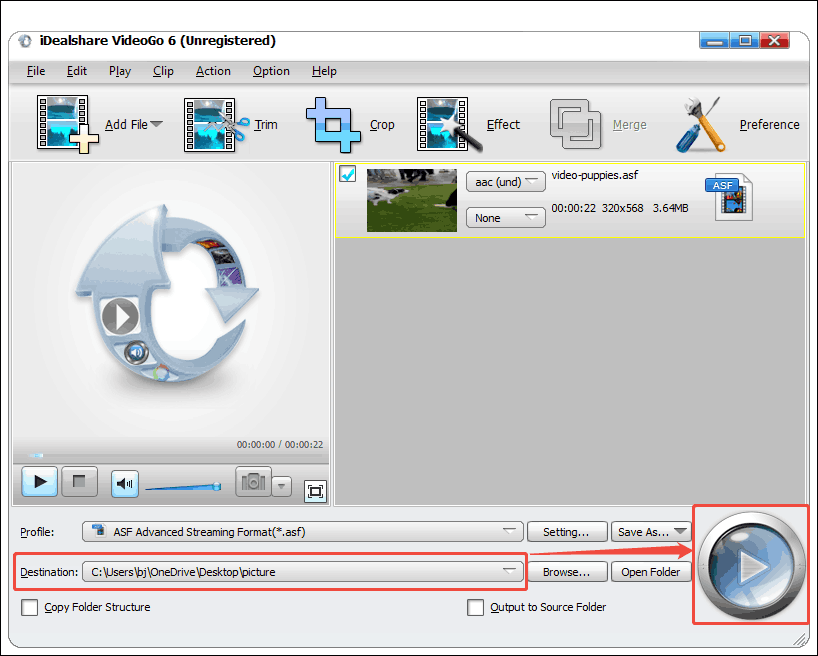
Expand the Destination option to determine a suitable saving folder. Then, click on the Convert button to start the conversion process.
Step 5. Locate the Converted Video
Once the conversion finishes, this video converter will take you to the folder you set before. Here, you can check the converted video.
iDealshare VideoGo is an efficient tool for DAV to ASF conversion. It is also relatively easy to use, even for beginners.
MiniTool Video ConverterClick to Download100%Clean & Safe
2. ConvertHelper
ConvertHelper is a web-based converter that supports converting DAV to ASF. Apart from video conversion, it also provides audio, archive, document, image, vector, and e-book conversion. ConvertHelper not only allows you to upload files directly but also supports importing target files from Google Chrome.
The tutorial below is on how to convert DAV to ASF using ConvertHelper.
Step 1. Navigate to ConvertHelper’s DAV to ASF Webpage
Visit https://www.converthelper.net/dav-to-asf to enter ConvertHelper’s DAV to ASF conversion page.
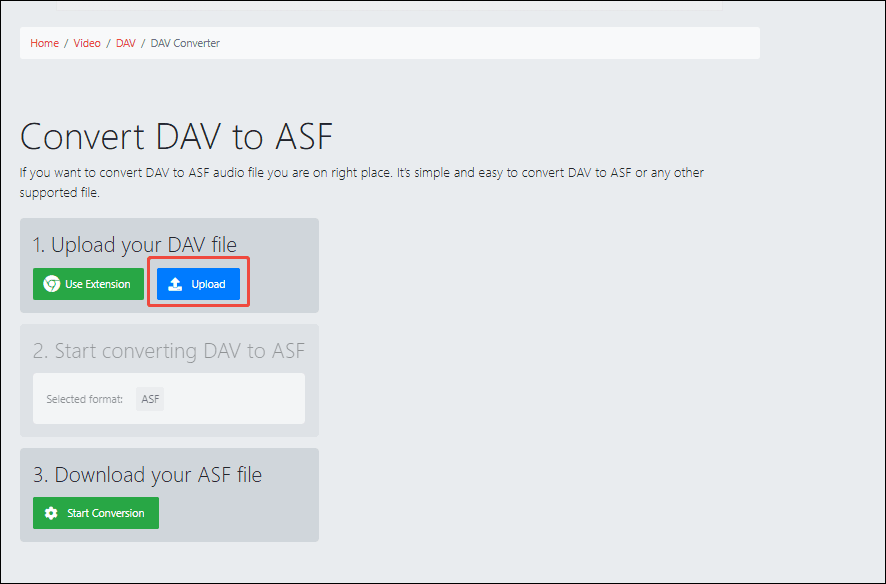
Step 2. Upload the DAV Video
Click on the Upload option to import the DAV video.
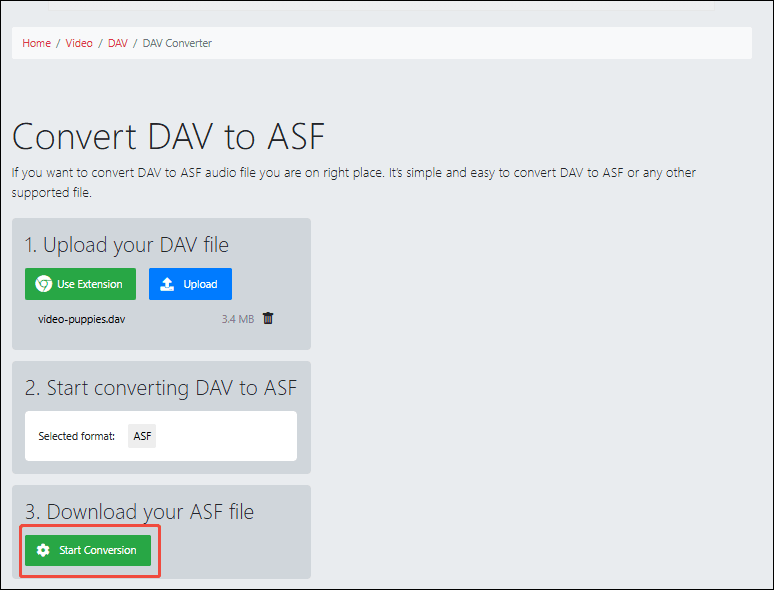
Step 3. Begin the Conversion Process
Click on the Start Conversion button to begin the conversion process.
Step 4. Download the Converted Video
Click on the Download button to save the converted video. Then, you can check it in the Downloads tab of your browser.
ConvertHelper’s conversion process is simple and fast. However, you may need to endure advertising interruptions during the conversion process.
Bottom Line
This article introduces you to DAV and ASF and their differences. It also focuses on how to convert DAV to ASF using an offline converter and an online converter: iDealshare VideoGo and ConvertHelper.
User Comments :