

This article tells the worth-trying anime enhancer: MiniTool Video Converter. This article also shares how to enhance an animation with it. Besides, the article compares the traditional anime video enhancer and the animation enhancer powered by AI technology.
Anime enhancement is an advanced digital restoration technique especially designed for animation. It uses AI (Artificial Intelligence) technology to improve the anime quality. Anime enhancement can enhance clarity and color vibrancy of a video without compromising its original artistic style.
Anime enhancement also detects blurry or unclear lines in animation and instantly corrects these issues, making lines sharp and clear. Additionally, animation enhancement increases the frame rate, resulting in a smoother viewing experience. Also, the widespread application of this technology has led to the development of numerous animation enhancement tools.
The Optimal Standard for Anime
Modern animation production typically uses FHD (1080p), a resolution that strikes a good balance between image quality and file size. Regarding the best encoding for animation, H.264 and H.265 video codecs are generally recommended, achieving a balance between compression and image quality. Additionally, an animated video is best suited for a frame rate of 24 FPS, providing a sense of story and engaging visuals. A 10-bit color space helps avoid color banding in animation.
The Best Anime Enhancer
When watching anime, clear footage quality makes me feel like I’m actually there. How can I improve the anime’s quality? After trying many tools, I discovered that MiniTool Video Converter can easily improve the sharpness and color vibrancy of animations while maintaining their original art style.
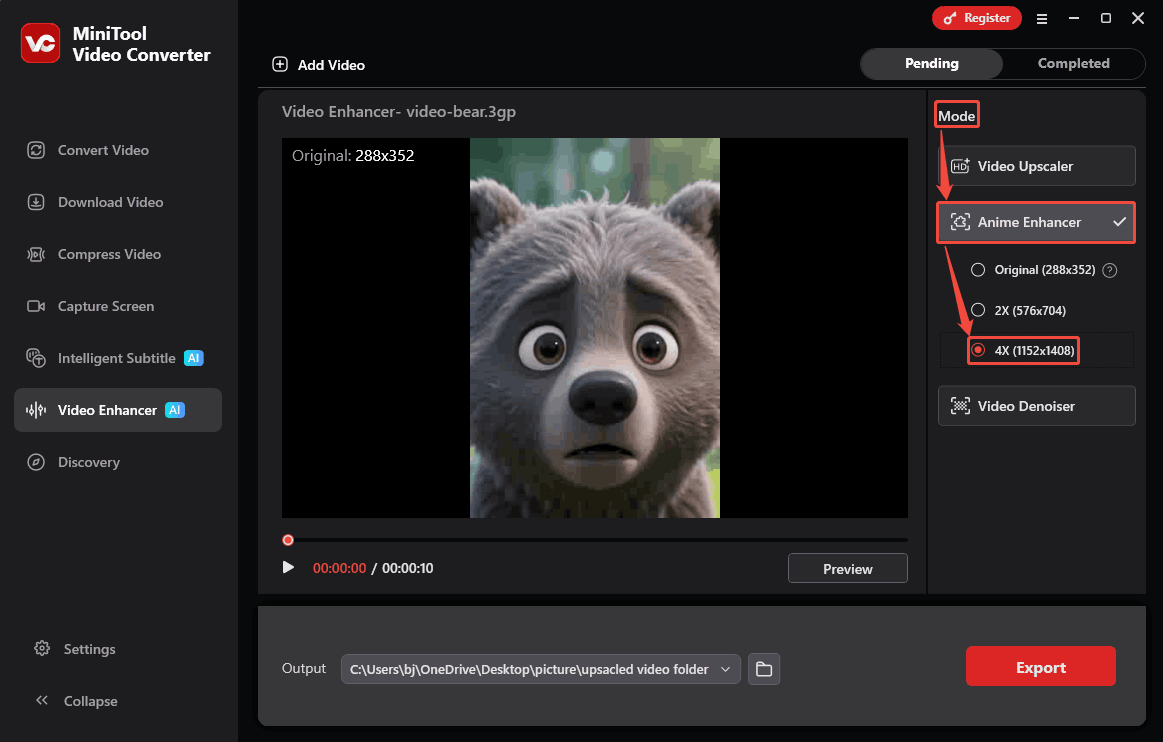
When adjusting video resolution, it allows me to customize animations with different resolutions. To fine-tune the video quality, choosing the original option is enough. For sharper footage, it’s ideal to choose the 2X option. If this anime requires professional-grade image quality, select 4X, which may be up to 4K resolution.
MiniTool Video Converter also allows me to preview the exported anime at frames. It supports importing multiple formats, such as MP4, MKV, MOV, AVI, WebM, 3GP, and FLV. In addition, MiniTool Video Converter provides clean, watermark-free works. It supports advanced video codecs to encode the output animations.
Below, let’s see how to enhance the anime quality with the anime AI enhancer using MiniTool Video Converter.
Step 1: Download and Install MiniTool Video Converter
Download MiniTool Video Converter and follow the prompts provided on the screen to install it.
MiniTool Video ConverterClick to Download100%Clean & Safe
Step 2: Import the Target Anime
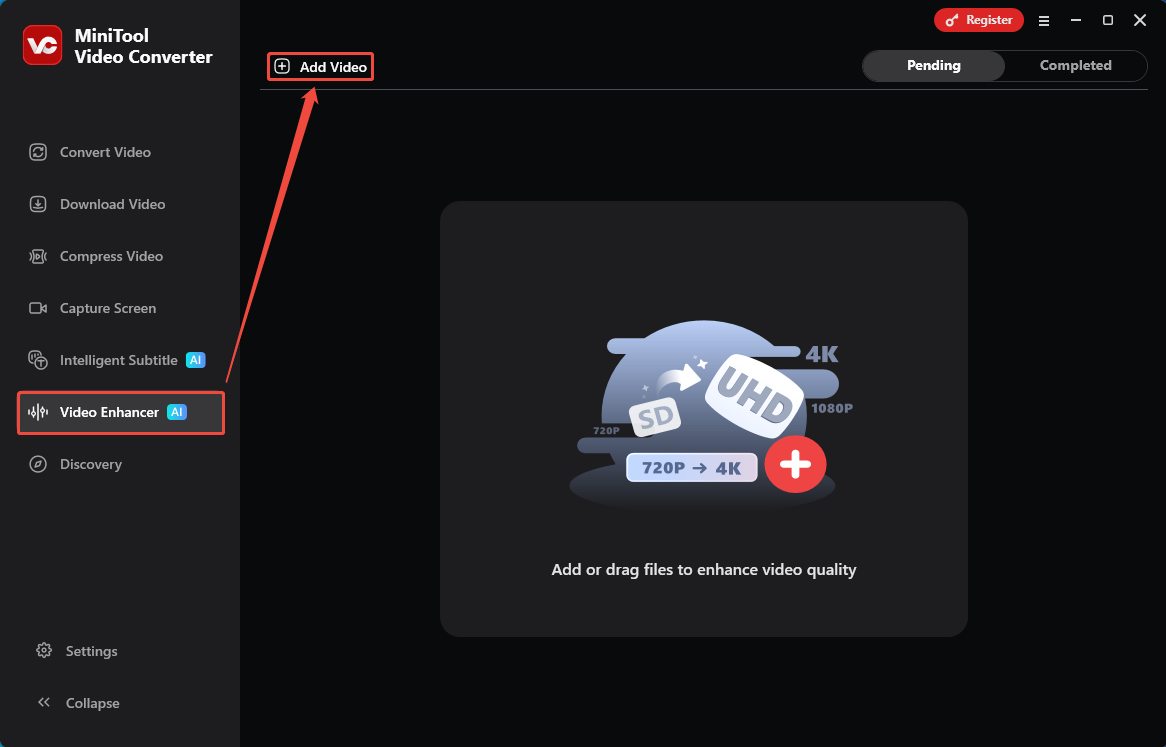
Launch MiniTool Video Converter. In the main interface, switch to the Video Enhancer tab. Then, click on the Add Video option to import the target anime.
Step 3: Choose a Desired Resolution
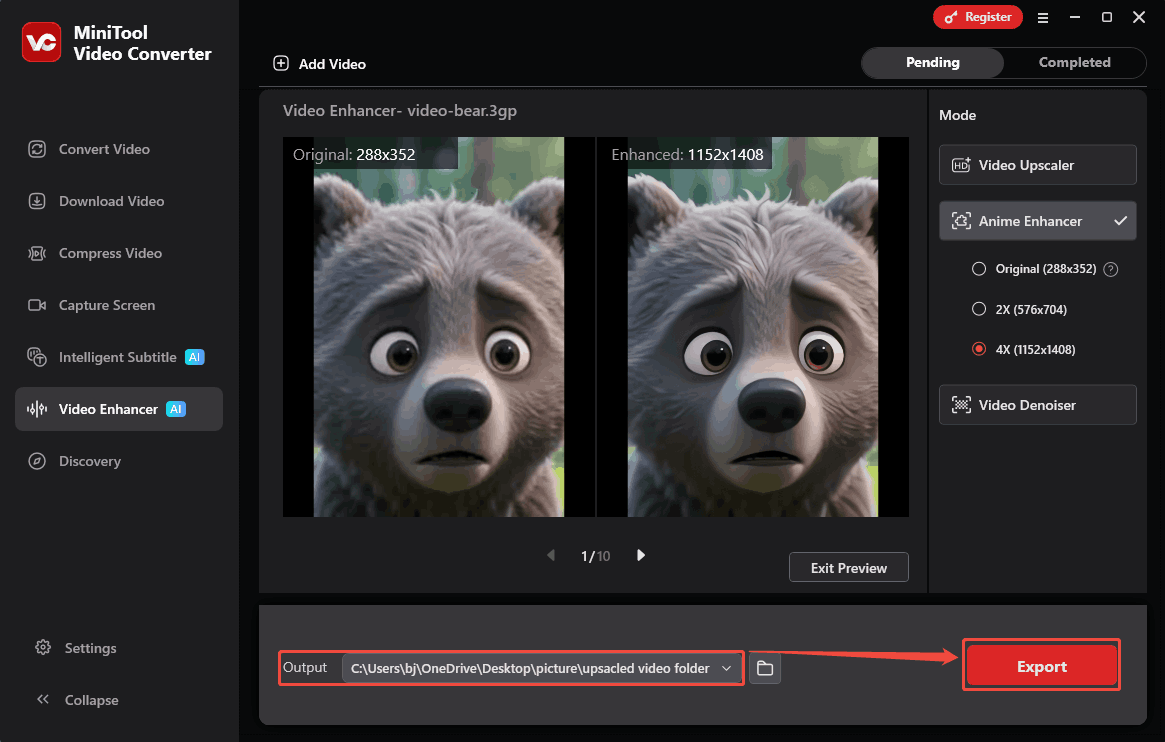
After that, shift focus to the Mode section. Here, choose an enhancer option for the anime. I want my animation to be of the highest possible quality. Therefore, I chose the 4X option, which will ultimately be rendered at a resolution of 1152x1408.
Step 4: Preview the Enhanced Anime Before Export
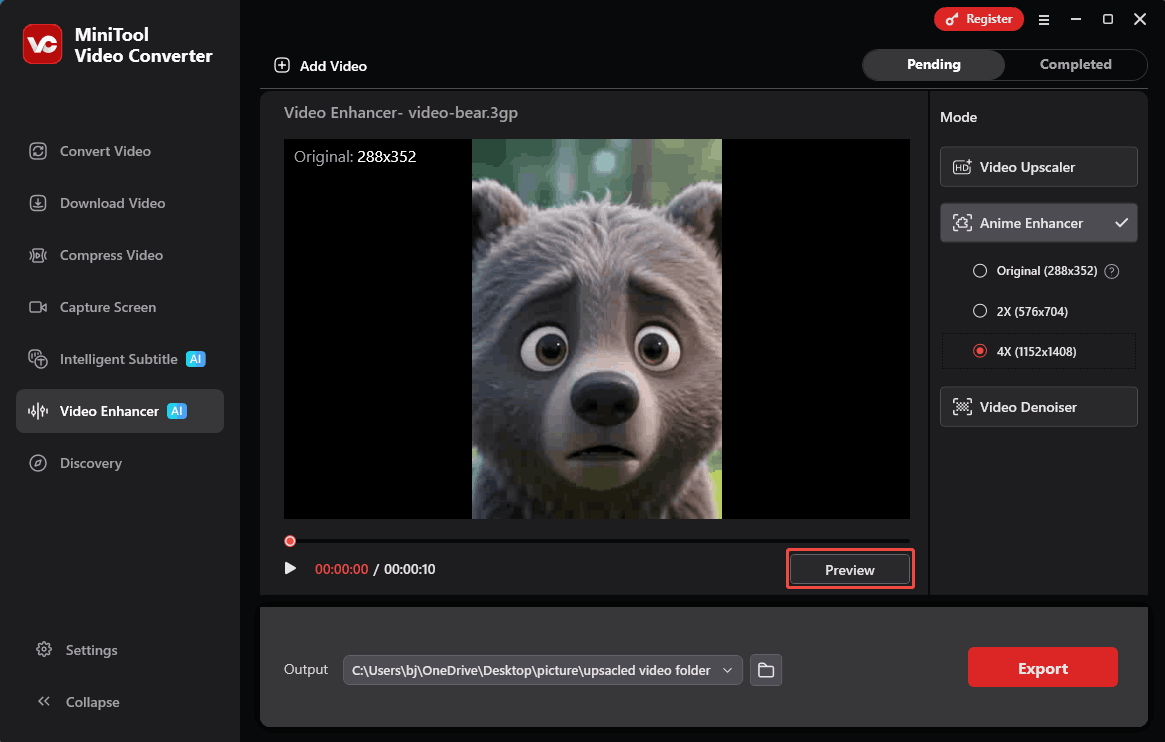
To see how the enhanced video looks, click on the Preview button to check it side by side at key frames.
Step 5: Start the Export
Before exporting, expand the Output option to set a saving path for the output anime. Then, click on the Export button to begin the export process.
Step 6: Check and Locate the Exported Anime
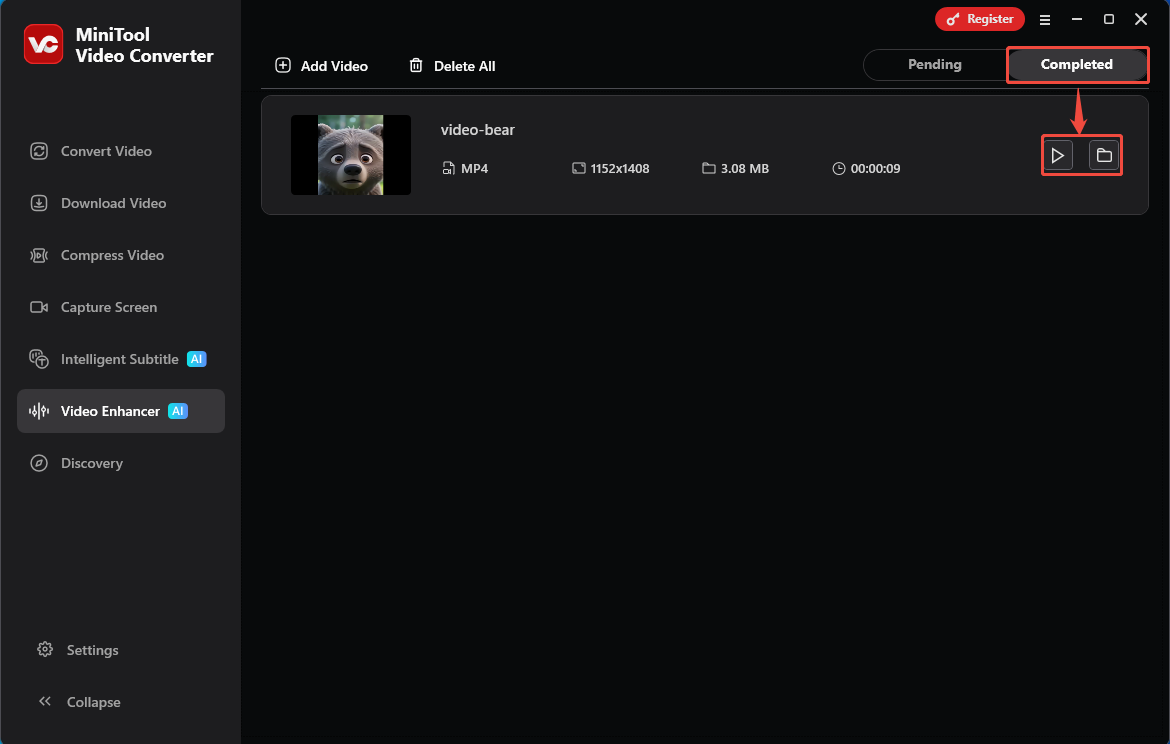
Once the export ends, this enhancer will automatically go to the Completed tab. There, click on the Play icon to check the exported video again. Or I can click on the Folder icon to find it on my computer.
MiniTool Video Converter is an anime video quality enhancer that helps me restore the video quality to HD. It is free of charge and easy to use.
The Reason for Enhancing Anime
Why Enhance animations? The following are 3 common reasons.
Revisit Animated Classics: Artificial intelligence technology enhances older animated works, allowing audiences accustomed to modern visual standards to experience the charm of classic pieces.
Accelerate Technological Development: The cost of AI-enhanced animation has significantly decreased, accelerating technological progress.
Enrich Social Media Content: Enhanced animation can also help content creators produce more high-quality works, enriching social media content.
Traditional Anime Enhancer vs AI-based Anime Enhancer
The anime AI enhancer is different from the traditional one. What exactly are the differences? The traditional anime enhancer processes each frame of a video at the pixel level, which reduces the line sharpness and contrast. However, AI-based enhancers are AI models trained specifically for animation that can intelligently add, remove, and refine lines, allowing viewers to perceive the subtlety of the visuals.
Traditional animation enhancers often fail to provide smooth transitions between frames, resulting in harsh visuals. AI can make motion in the footage much smoother, reducing stuttering and blurring in the video. While AI can enhance the aesthetics of animation, sometimes over-reliance on AI leads to a lack of narrative in the videos. Therefore, the decision to use AI to enhance the visuals should be based on the animation’s content.
Wrap Things Up
This article focuses on an excellent anime enhancer: MiniTool Video Converter, and explains in detail how to use it. Furthermore, it explains why anime enhancement is necessary, typically for revisiting classic anime, accelerating the development of anime technology, and enriching social media content. The article also compares traditional anime enhancers and AI-powered anime enhancers. They each have their advantages and should be considered according to the specific circumstances.
If you are interested in MiniTool Video Converter, feel free to contact MiniTool’s official support via email at support@minitool.com.
User Comments :