

This article compares FLV and FLAC formats. It also shows how to convert FLV to FLAC by importing the target FLV file, selecting FLAC as output format, adjusting optional settings, and starting conversion using MiniTool Video Converter or FreeConvert.
Understanding FLV
Short for Flash Video, FLV refers to a video format that supports video playback on Adobe Flash Player. Created by Adobe, the FLV format was popular due to its small file size and outstanding streaming capabilities.
However, because Flash was discontinued by Adobe in 2020, FLV is less widely used.
Understanding FLAC
Standing for Free Lossless Audio Codec, FLAC refers to an audio format with an open-source nature. It enables you to reduce the audio file size without any quality loss. In other words, FLAC empowers you to strike a good balance between audio quality and file compression.
How to FLV to FLAC
Fast Steps:
- Open a desktop or online video converter.
- Import the FLV file.
- Choose FLAC as the output format.
- Start conversion.
You can convert FLV to FLAC with MiniTool Video Converter and FreeConvert.
Option 1. MiniTool Video Converter
1. Install MiniTool Video Converter.
Download and run the free installer.
 MiniTool Video Converter
-
 Batch convert video/audio files among 1000+ formats.
 - Quickly compress videos for easy storage and transfer.
- Accurately extract subtitles from video/audio files.
- Effectively enhance video quality.
2. Import the FLV file.
Open the Convert Video tab and click Add Files to import the target FLV file.
3. Choose FLAC.
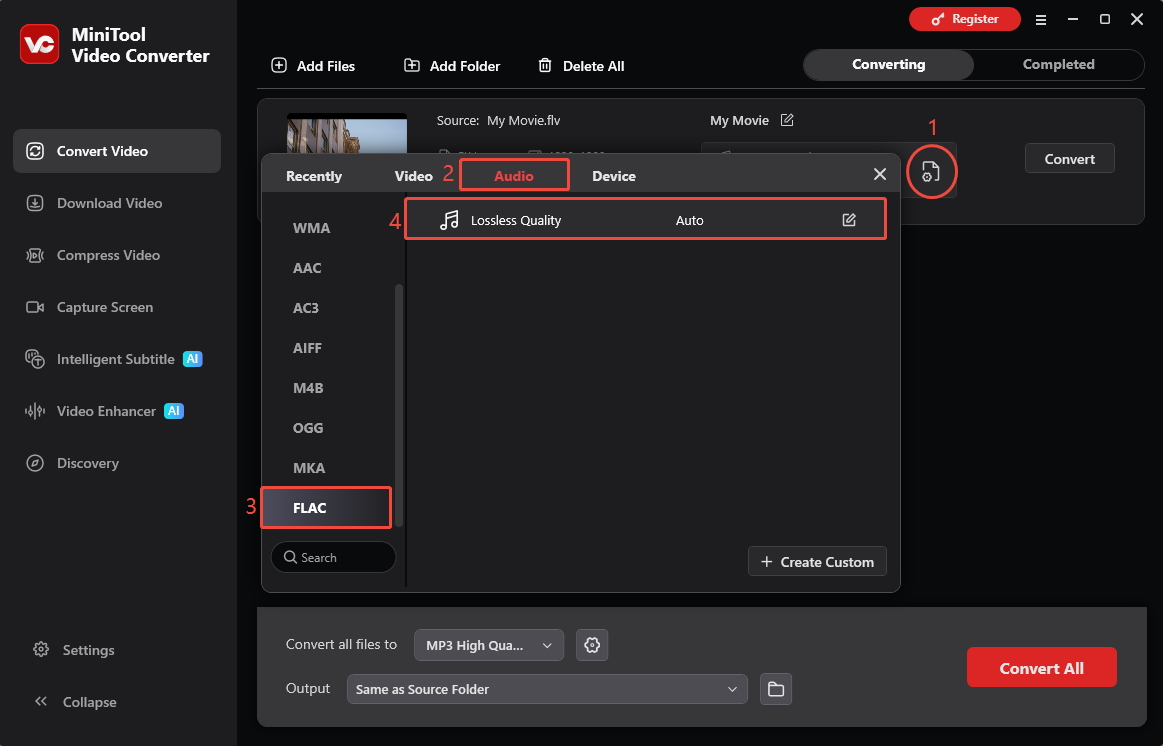
Click the gear icon, go to Audio > FLAC, and choose Lossless Quality.
4. Start converting.
Click Convert to start the process.
Option 2. FreeConvert
FreeConvert is a powerful web-based converter that enables you to convert FLV to various formats, including FLAC, AAC, AIFF, ALAC, AMR, MP3, OGG, WAV, WMA, and so on. Additionally, it empowers you to upload your FLV videos from multiple sources, including Google Drive, OneDrive, Dropbox, and more.
Below is a detailed guide on how to convert FLV to FLAC using FreeConvert.
1. Go to the FLV to FLAC Converter page of FreeConvert.
Visit https://www.freeconvert.com/flv-to-flac.
2. Import the FLV videos.
Click on the Choose Files option to upload the FLV files that you want.
3. Start conversion and check the converted files.
Click on the Convert button to begin the conversion process. When the file conversion completes, download and check the output files.
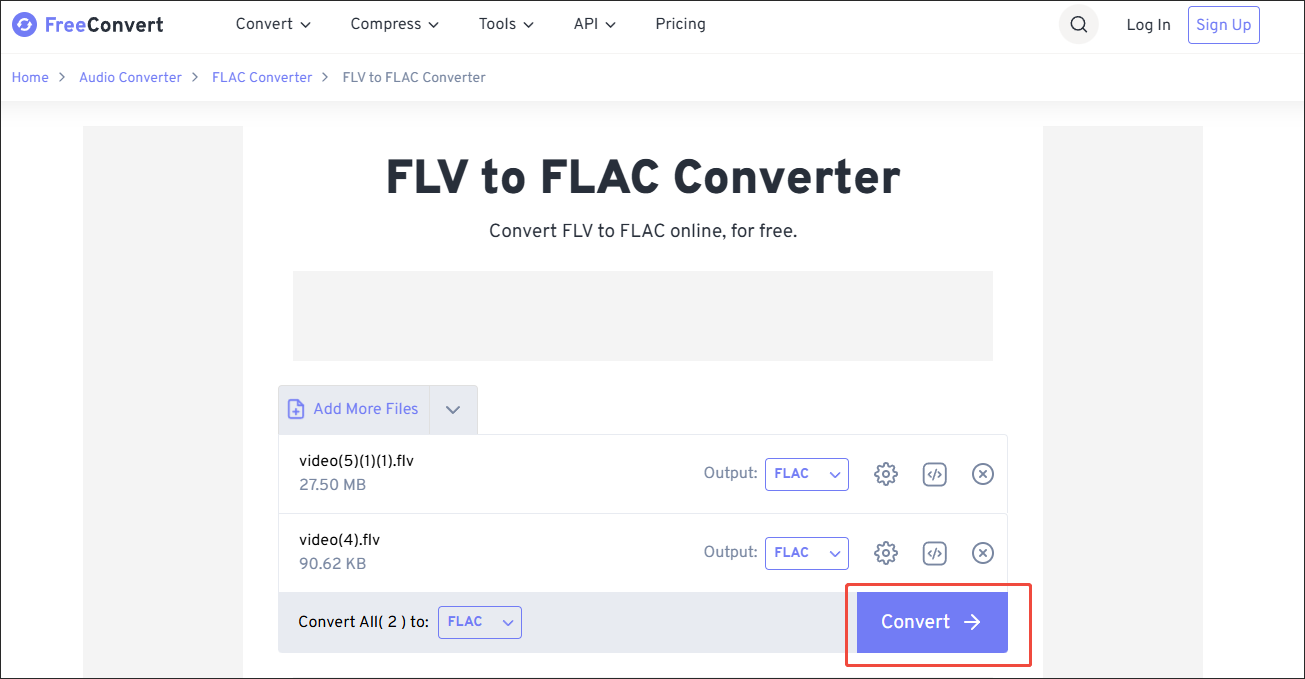
With the above-detailed steps, it will never be difficult for you to convert FLV to FLAC. However, it set a 1 GB file size limit for free users. If you want to extend the file size limit, you need to sign up. By the way, FreeConvert also enables you to convert FLAC to FLV.
Bottom Line
To convert FLV to FLAC and extract high-quality lossless audio from video files, you can use a desktop converter or an online tool. FreeConvert offers convenience, while MiniTool Video Converter provides stable offline conversion.
For questions or suggestions about MiniTool Video Converter, contact the support team at support@minitool.com.
People Also Ask
2. Click Add to import the FLV file.
3. Click Convert/Save at the bottom.
4. Select Audio – FLAC.
5. Click Browse to choose a destination.
6. Click Start.
User Comments :