

This article covers the core difficulties and typical reasons for converting AAC to MIDI. Also, it walks you through the conversion process using 2 excellent converters, including AnyConv and AUDIO-CONVERT.
AAC Explained
AAC (Advanced Audio Coding) is a lossy digital audio format. This format was first defined in the MPEG-2 and was later optimized in MPEG-4. AAC’s appearance is to become an alternative to MP3. Importantly, AAC's advantage lies in its efficient compression and higher sound quality than MP3 at the same bitrate.
AAC is a very popular format, which leads many companies to use it as their default or standard audio format in their products, such as Apple and Sony. Additionally, AAC also supports many devices and applications.
MIDI Explained
MIDI (Musical Instrument Digital Interface) is a set of musical notes. It connects to computers, electronic music, and audio devices when performing, recording, and editing music. Therefore, MIDI allows for the storage and exchange of data. Its extension name is .mid or .midi.
MIDI files are small in size and easy to modify and use. They are also compatible with a variety of electronic instruments, synthesizers, or digitally sampled sound sources. However, MIDI records note information, which means it is easy to change into other notes.
Why Convert AAC to MIDI
If you want to convert an AAC audio file into editable notes, you can convert AAC to MIDI. Or to reduce AAC file size, converting to MIDI is ideal. Also, on condition that you want to transmit AAC audio to electronic music devices, computers, or professional equipment for creating completely new tracks, you should convert it to MIDI format.
The Difficulties of AAC to MIDI Conversion
AAC stores audio information, while MIDI records note information. Converting AAC to MIDI requires the AAC file itself to have good audio quality and clarity. Otherwise, the converted sound will be a mess with difficult-to-edit audio.
How to Convert AAC to MIDI
Are you still looking for a marvelous AAC to MIDI converter? The following part is how to complete this conversion with 2 online converters.
1. AnyConv
AnyConv is an online video converter that can efficiently convert AAC to MIDI. It also supports converting audio, videos, documents, e-books, and images. AnyConv accepts over 300 formats, including AAC, MP3, AIFF, OGG, MP4, OGV, MKV, FLV, and more. It focuses on users’ file security and automatically deletes uploaded and converted files within 1 hour.
However, AnyConv restricts the maximum conversion file size to 100MB. So, it is more suitable for converting small-sized files. Below is a detailed tutorial on how to convert AAC to MIDI with AnyConv.
Step 1. Visit AnyConv’s Homepage
Navigate to https://anyconv.com/aac-to-mid-converter/ to access AnyConv’s homepage.
Step 2. Upload the AAC File
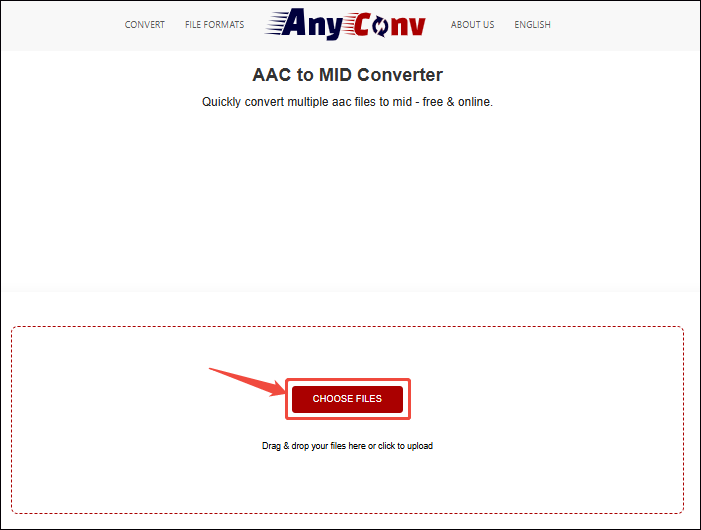
After entering the AAC to MIDI conversion interface of AnyConv, click on the CHOOSE FILES option to import the AAC file you have prepared.
Step 3. Start the Conversion Process
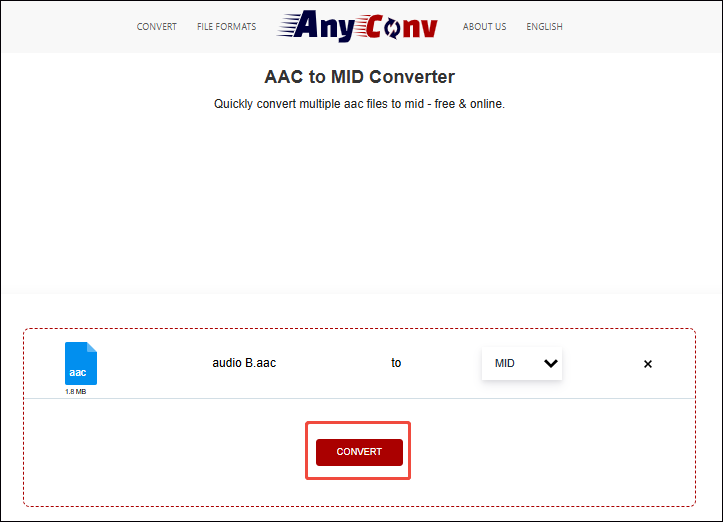
When the AAC file is imported, click on the Convert button to start the conversion.
Step 4. Download the Converted Audio
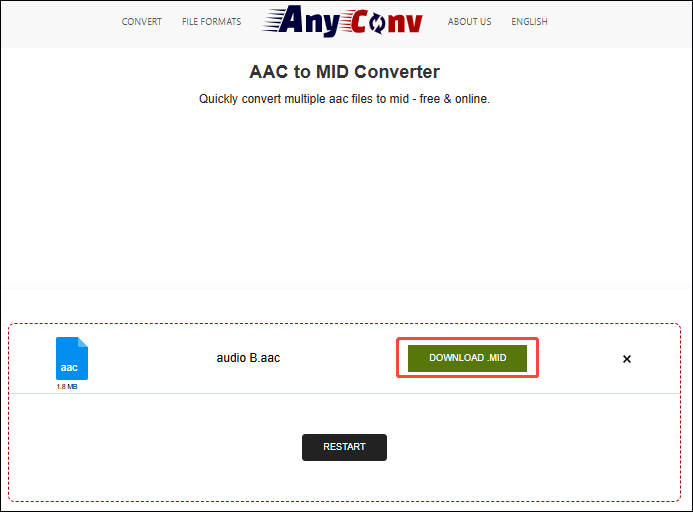
After a few seconds, this online converter will go to the download page. There, click on the Download button to save this converted audio.
AnyConv is a suitable online converter that turns AAC to MIDI under 100MB.
2. AUDIO-CONVERT
AUDIO-CONVERT is a web-based converter. It supports various audio formats, including AAC, MIDI, MP3, M4A, WAV, OGG, FLAC, WMA, and more. Besides, AUDIO-CONVERT has an unlimited file size, making free conversion all the time. It also allows you to convert audio in bulk. Apart from uploading files from local folders, AUDIO-CONVERT enables you to import audio files from Dropbox and links.
Step 1. Open AUDIO-CONVERT’S Webpage
Go to https://audio-convert.com/aac-converter/aac-to-midi to enter AUDIO-CONVERT’s webpage.
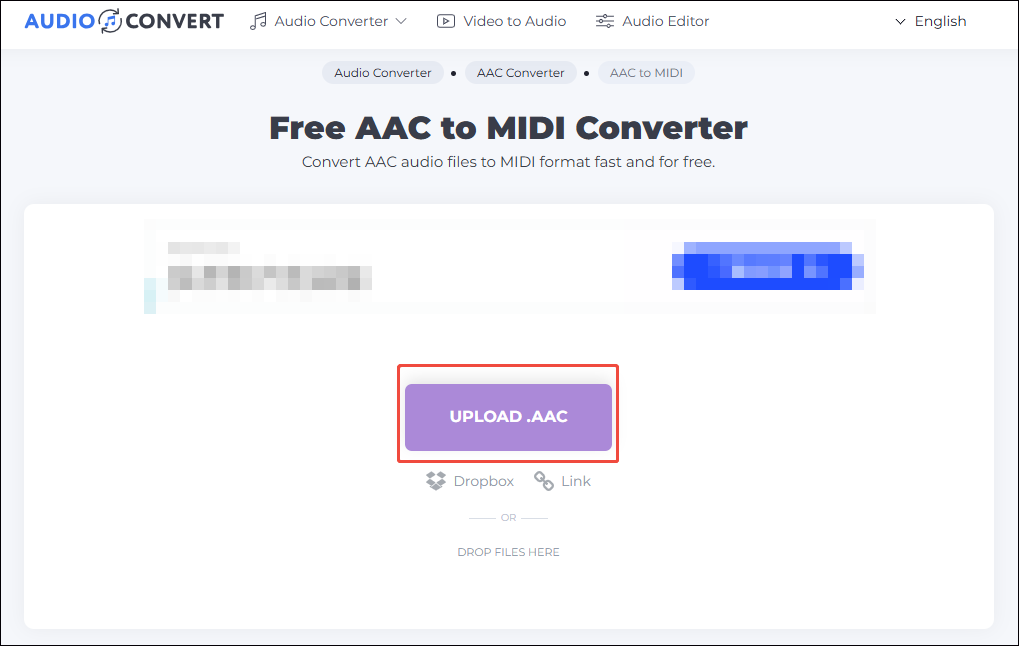
Step 2. Add AAC Audio to AUDIO-CONVERT
Click on the UPLOAD option to add the AAC audio file.
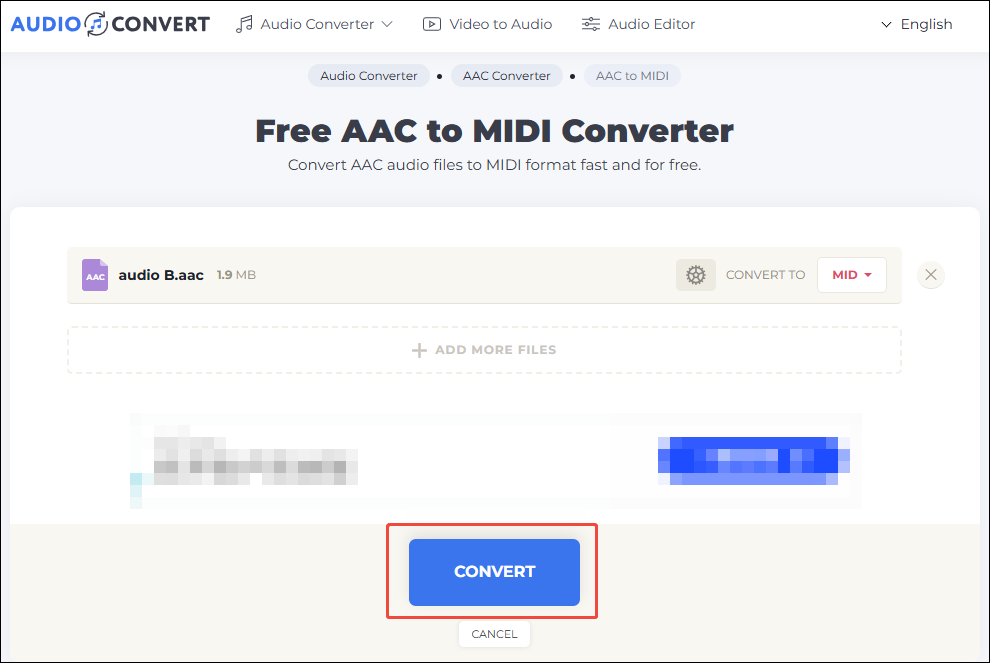
Step 3. Begin the Conversion Process
Click on the Convert button to begin the conversion process.
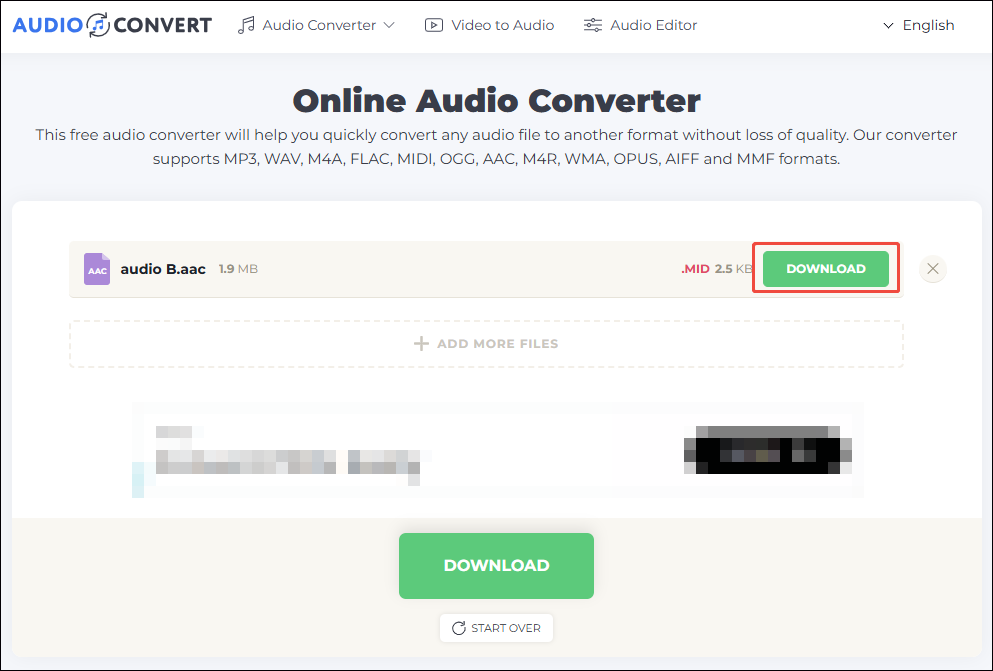
Step 4. Save the Converted Audio
Once this conversion ends, click on the DOWNLOAD button to save the converted audio.
Using AUDIO-CONVERT to convert AAC to MIDI is efficient. However, it has some annoying ads that may affect your visual experience.
MiniTool Video ConverterClick to Download100%Clean & Safe
Final Words
Learn what AAC and MIDI are and why convert AAC to MIDI. This article spotlights how to perform this conversion with 2 online converters: AnyConv and AUDIO-CONVERT. Since AnyConv only supports format conversion for an audio file smaller than 100MB, if your file is larger than 100MB, you can use AUDIO-CONVERT.
User Comments :